The Information tab in the domain report shows general details about the domain and the report: domain name, TLD, name length, digits and hyphens, Open PageRank, and report creation date. For reports from Checker (tasks), Task ID and check date (Expired Checker) are also shown. If there are active auctions (not yet ended), an Auctions block appears with links to listings, price, bids, and end time.
Which fields appear depends on report type and available data; missing values are omitted or shown as “N/A”.
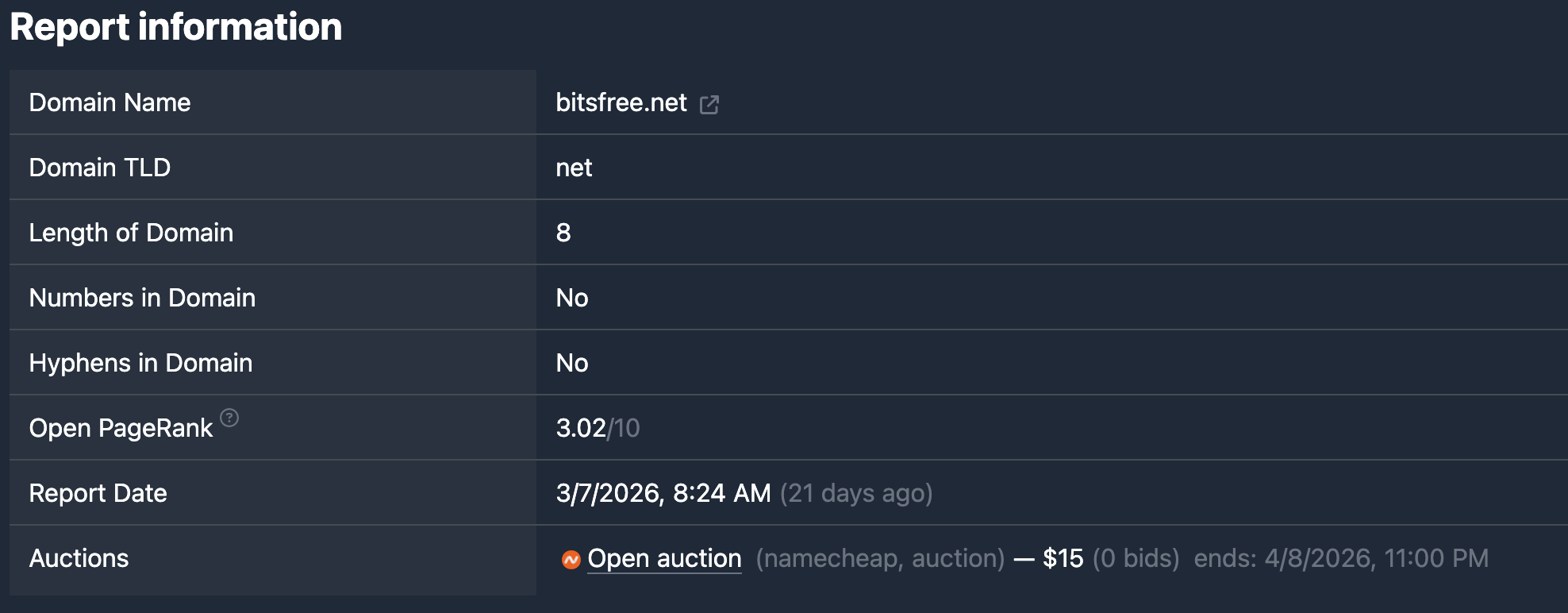
Heading
At the top of the tab is the Information heading (or a localized label such as “Information”). There is no separate explanatory paragraph in the component.
Domain and report fields
Each field is a “label — value” row.
Domain Name — full domain name. It may be masked in demo mode. An “open in new tab” icon on the right opens the site at http://domain.tld. In demo the link may be inactive.
Domain TLD — domain zone (e.g. com, net). Value as in the report data.
Length of Domain — length of the domain name (without TLD), in characters.
Numbers in Domain — whether the domain name contains digits. Yes or No (or “N/A” if unknown).
Hyphens in Domain — whether the domain name contains hyphens. Yes or No (or “N/A”).
Open PageRank — Open PageRank score (scale up to 10). Shown as a number and “/10”. Next to the label is a link icon to “What is Open PageRank” on openpagerank.com. If missing — “N/A”.
Report Date — when the report was added to the system. Format: date and time in the selected locale, plus relative time in parentheses (e.g. “3 days ago”).
Extra fields for Checker reports
If the report belongs to a user task (Checker), the same list also includes:
Expired Checker — check date (e.g. drop check). Format: date and time plus relative time in parentheses.
Task ID — task identifier. Rendered as a link: click navigates to that task’s report list (task page). Quick jump from report to task.
Active auctions
If the report has active auctions (still running: end time not reached), an Auctions block appears.
Under the Auctions heading there is a bullet list. Each item:
- Open link and marketplace favicon — go to the auction listing. In demo the link may be inactive.
- In grey parentheses — marketplace name and sale type (as in auction data: e.g. open auction or closeout).
- Price in US dollars (with digit grouping).
- In grey parentheses — bid count (“N bids”).
- Ends: and auction end date/time in the selected locale.
Only auctions that have not ended at display time are shown. If there are none, the Auctions block is omitted.
In short
- The Information tab shows Domain Name (and site link), TLD, Length, Numbers in Domain, Hyphens in Domain, Open PageRank (and description link), Report Date.
- For Checker reports: Expired Checker and Task ID (link to task).
- When there are active auctions — Auctions with links, price, bids, and end time.