- Heading and Majestic link
- Main metrics (circle block)
- Filtering by Majestic metrics in search
- In short
The Majestic tab in the domain report shows Majestic metrics: Trust Flow, Citation Flow, Majestic Ratio, backlink and referring domain counts. Data comes from Majestic; Karma.Domains shows the export already retrieved. Ratio is Trust Flow divided by Citation Flow and is calculated when the metrics are saved.
If there is no Majestic data, the tab shows only the heading and (no data). Other blocks are hidden.
Heading and Majestic link
At the top — Majestic heading and short text that data is external, with a Majestic.com link. It opens Majestic Site Explorer for this domain (domain filled in) in a new tab. In demo mode the link may be inactive.
Main metrics (circle block)
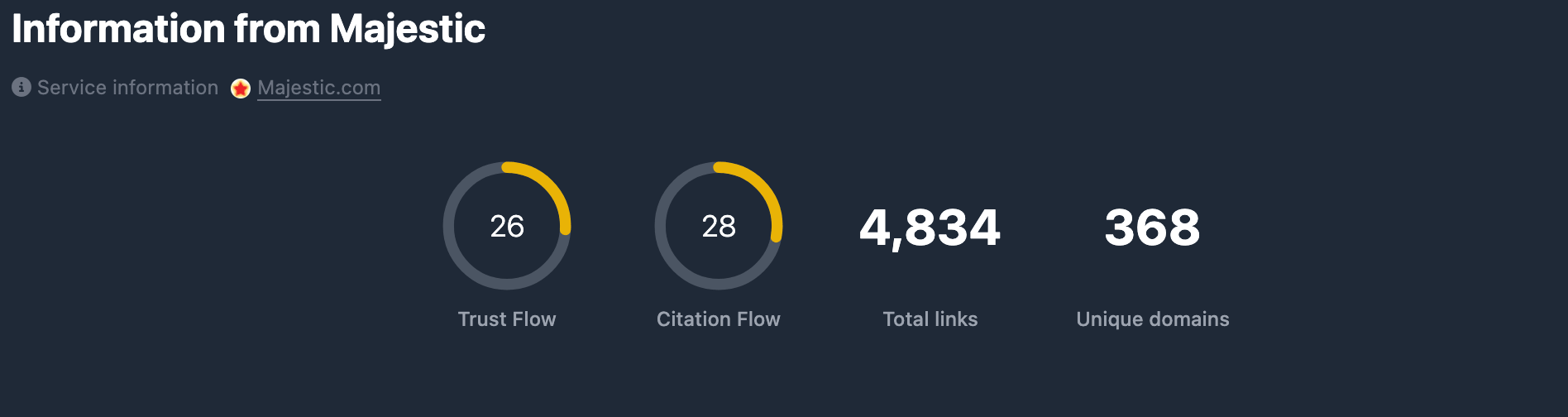
Five indicators in one block:
Trust Flow (TF) — circular chart 0–100. Reflects trust of linking sites per Majestic. Circle color depends on level (low / medium / high). If missing — —.
Citation Flow (CF) — circular chart 0–100. Reflects citation strength — how much the domain is linked to. Same color thresholds. If missing — —.
Majestic Ratio — Trust Flow divided by Citation Flow, shown as a number with two decimal places (for example 0.80). It is not a 0–100 chart. Empty when Citation Flow is 0 or either value is missing — —.
Backlinks (BL) — backlink count. Number with digit grouping. If missing — —.
Referring Domains (RD) — unique referring domains. Number with digit grouping. If missing — —.
Filtering by Majestic metrics in search
Majestic metrics from the report (Trust Flow, Citation Flow, Majestic Ratio, backlinks, referring domains) can be used when selecting domains in database tables — in the Majestic filters block. Details are in Majestic filters.
In short
- The Majestic tab shows Trust Flow, Citation Flow, Majestic Ratio, Backlinks, Referring Domains.
- Filter search by Majestic parameters — see Majestic filters.