- Heading and link to Moz
- Main metrics (circle block)
- Domain Authority History
- Additional Metrics
- Top Backlinks (backlink table)
- Filtering by Moz metrics in search
- Summary
The Moz.com tab in the domain report shows Moz metrics: Domain Authority, Spam Score, counts of referring pages and domains, extra page- and domain-level figures, and when available Domain Authority history and a top backlinks table. Data comes from Moz; Karma.Domains shows the export that was already fetched.
If the report has no Moz data, the tab shows only the heading and the note (no data). Other blocks are hidden.
Heading and link to Moz
At the top of the tab are the Moz.com heading and short text that the data is from an external source, with a Moz.com link. Clicking it opens Moz’s domain analysis page (with the domain filled in) in a new tab. In demo mode the link may be inactive.
Main metrics (circle block)
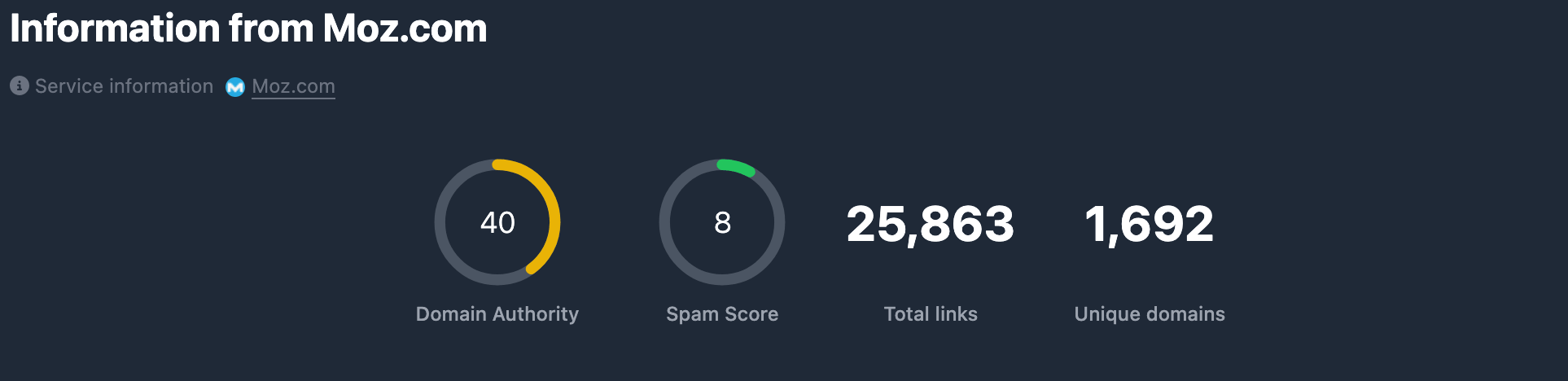
Four indicators appear in one block:
Domain Authority (DA) — circular gauge from 0 to 100. Reflects the domain’s “authority” in Moz’s model. Ring color depends on level (low / medium / high). If the value is missing, a dash — is shown.
Spam Score — circular gauge from 0 to 100. Indicates how likely the domain is to be seen as spam: higher means higher risk. The color scale is inverted (a high score is worse). If data is missing — —.
BL (Backlinks) — number of external pages linking to the subdomain (in Moz often labeled Pages to Subdomain or similar). Shown as a digit with thousands separators. If missing — —.
RD (Referring Domains) — number of root domains that link to the subdomain. Digit with thousands separators. If missing — —.
Domain Authority History
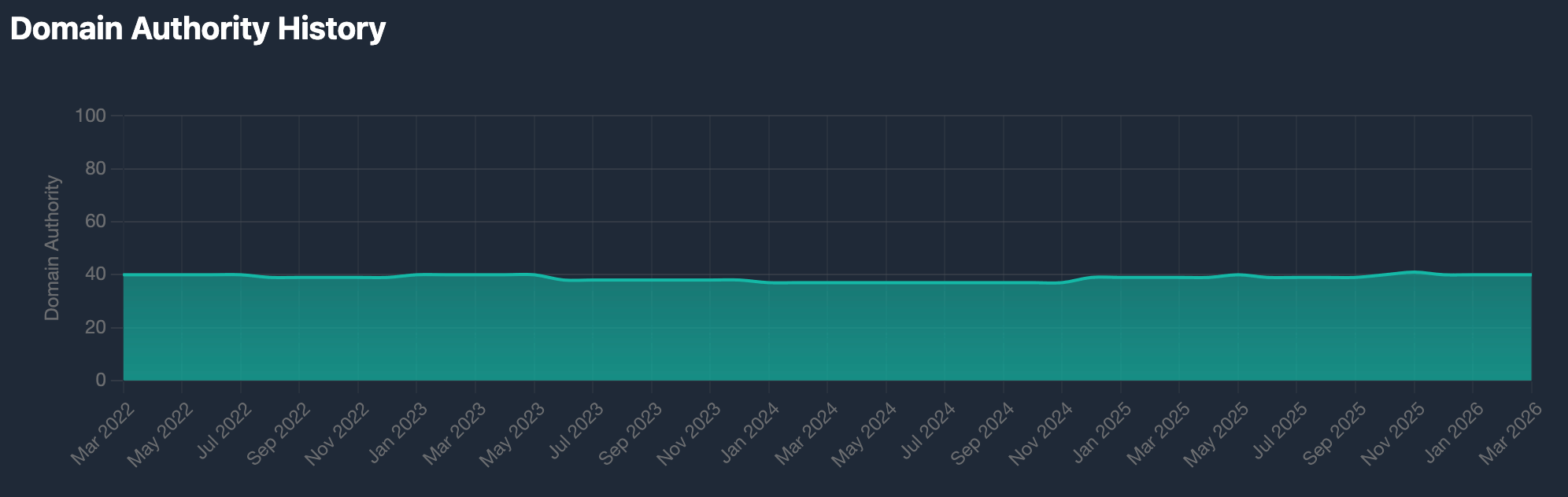
When the report includes Domain Authority history (Domain Authority History), a chart appears under the main metrics: months along the horizontal axis (oldest to newest), DA (0–100) on the vertical axis. It shows how domain authority changed over time. Month labels use the selected language.
Additional Metrics
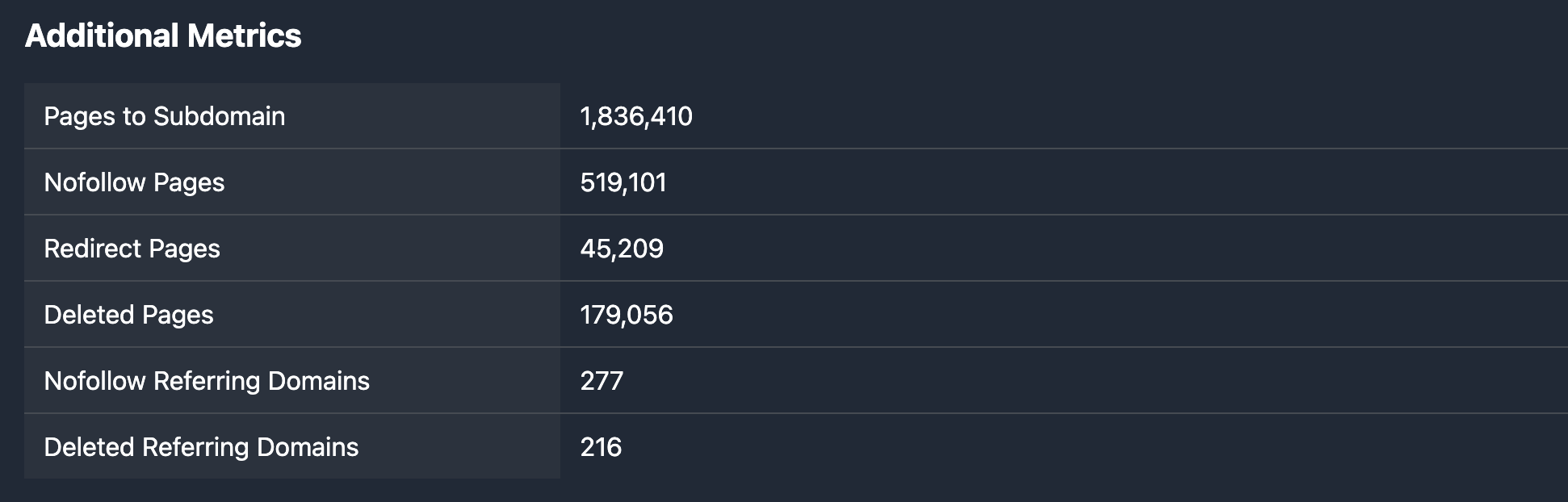
The Additional Metrics heading and a list of “parameter — value” rows:
- Pages to Subdomain — number of pages (Moz) pointing to the subdomain.
- Nofollow Pages — pages with a nofollow attribute linking to the subdomain.
- Redirect Pages — redirect pages among referring URLs.
- Deleted Pages — deleted pages that used to link to the subdomain.
- Nofollow Referring Domains — referring root domains where all links are nofollow.
- Deleted Referring Domains — root domains that used to link but are removed or no longer link.
Values are digits with thousands separators. Missing fields show —.
Top Backlinks (backlink table)
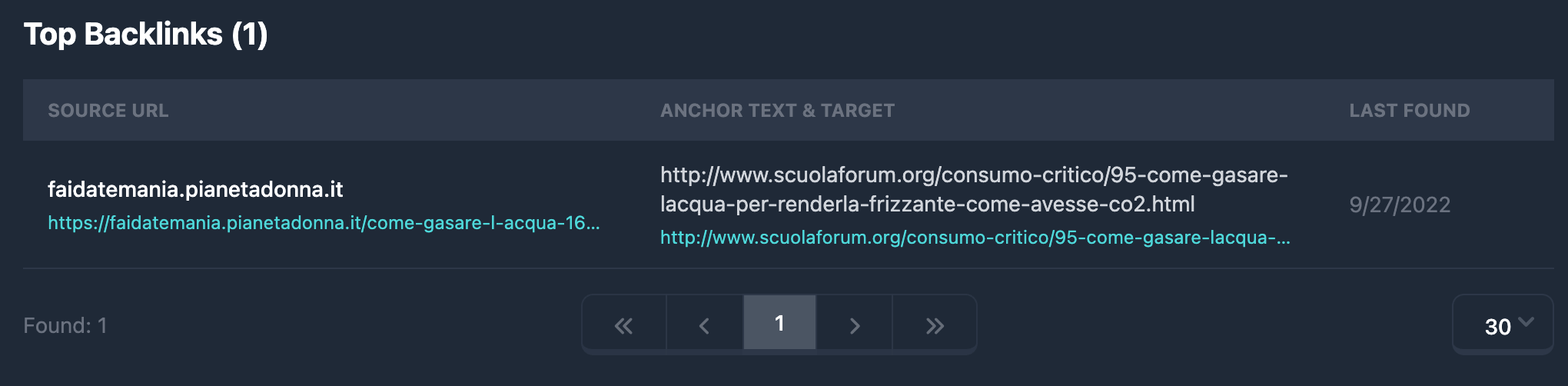
When the report includes a backlink list, a Top Backlinks block appears with the total count in parentheses, e.g. Top Backlinks (150).
The table has three columns:
- Source URL — source domain and full page URL with the link. Domain in bold; URL is a link (in demo it may be hidden or limited). Opens the source page in a new tab.
- Anchor Text & Target — anchor text and target URL. If there is no anchor, —. Target URL is a link. In demo, text may be masked.
- Last Found — date the link was last seen (locale format).
Rows have a max height; long URLs and anchors are truncated with an ellipsis; full text appears on hover (title) or by following the link.
Pagination under the table: 30 rows per page by default; you can change pages and page size.
Filtering by Moz metrics in search
Moz metrics from the report (especially Domain Authority, Spam Score, backlink and referring-domain counts, and when needed URL and anchor conditions for backlinks) also apply when selecting domains in database tables — the same fields are in the Moz filter block. Ranges, text fields, AND / OR logic, and limits are explained in Moz filters.
Summary
- The Moz.com tab shows Domain Authority, Spam Score, BL (external pages), RD (referring domains).
- When data exists — Domain Authority History chart by month.
- Additional Metrics — Pages to Subdomain, Nofollow/Redirect/Deleted Pages, Nofollow/Deleted Referring Domains.
- When data exists — Top Backlinks table (Source URL, Anchor Text & Target, Last Found) with pagination.
- You can filter search in databases with the same Moz parameters — see Moz filters.