- Heading and link to SimilarWeb
- Estimated monthly visits (chart)
- Traffic sources and engagement metrics
- Traffic geography (top countries)
- Filtering by SimilarWeb data in search
- Summary
The SimilarWeb tab in the domain report shows SimilarWeb data: estimated monthly visits by month, traffic sources and engagement metrics for the selected month, and when available traffic distribution by country (top countries). Data comes from SimilarWeb; Karma.Domains shows the export that was already fetched.
If the report has no SimilarWeb data, the tab shows only the heading and (no data). Other blocks are hidden.
Heading and link to SimilarWeb
At the top are the SimilarWeb heading and short text that the data is external, with a SimilarWeb.com link. Clicking opens SimilarWeb’s site analysis for this domain in a new tab. In demo mode the link may be inactive.
Estimated monthly visits (chart)
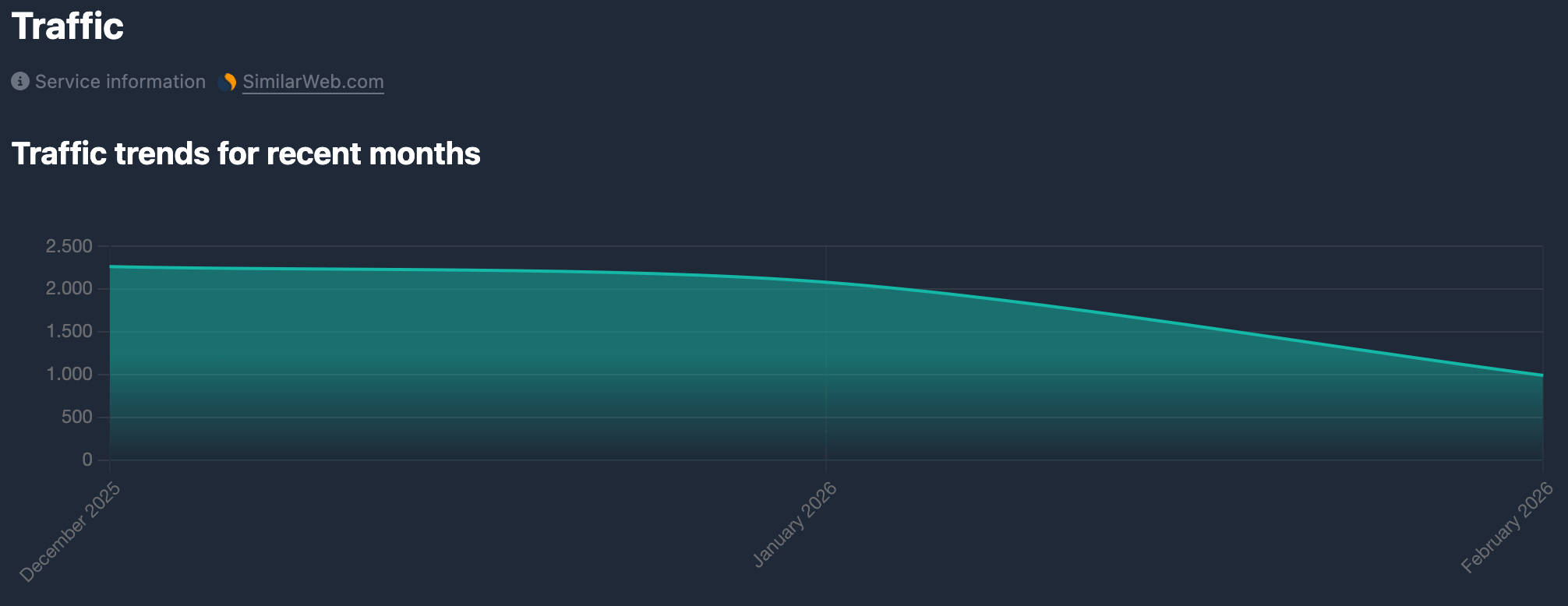
Block title (e.g. “Estimated monthly visits” or the localized equivalent) and a line chart: horizontal axis — months (“Month year”), vertical axis — estimated visit count. The chart shows how SimilarWeb-estimated traffic changed over time. The area under the line may be filled with a gradient.
Traffic sources and engagement metrics
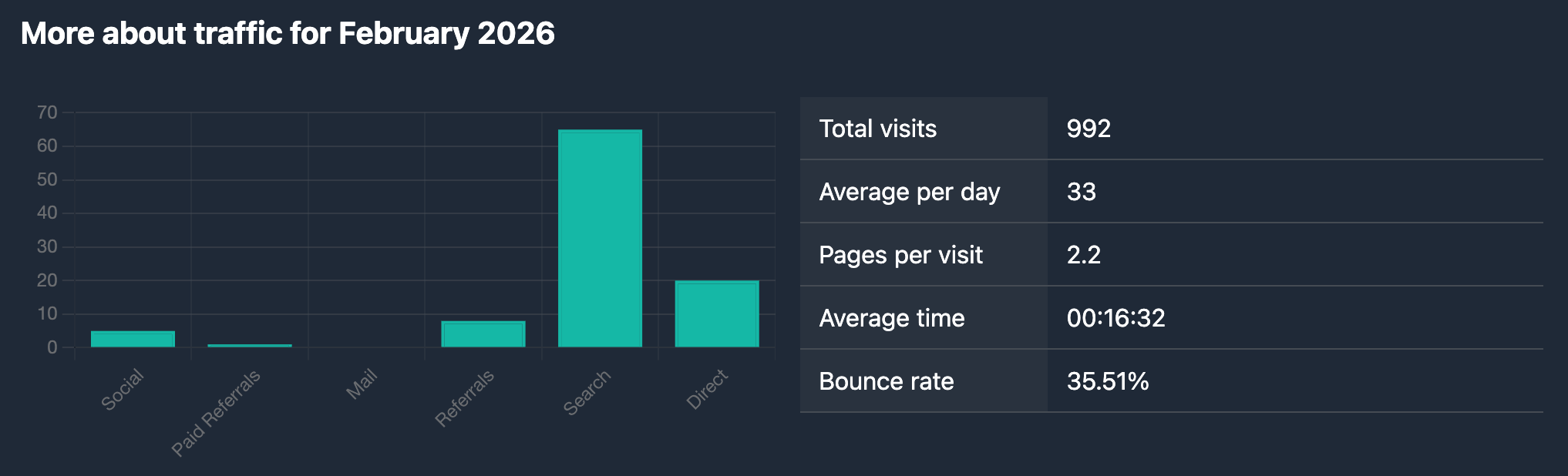
The heading includes the block name and the month and year the data refers to (e.g. “December 2024”).
The block is split into two columns.
Left column: traffic sources
Bar chart — share of traffic sources in the selected month. Horizontal axis: source names (Organic Search, Direct, Paid Search, Social, Referrals, etc.), vertical axis — percentage share. Shows where traffic to the domain mainly comes from.
Right column: engagement metrics
“Parameter — value” rows for the same month:
- Visits — total visits. Number with digit grouping.
- Visits per day — average visits per day (monthly visits / 30). Number with digit grouping.
- Pages per visit — average pages viewed per visit. One decimal place.
- Time on site — average time on site per visit. Format
hours:minutes:seconds(HH:MM:SS). - Bounce rate — share of single-page visits, in percent. Two decimal places and a % sign.
Traffic geography (top countries)
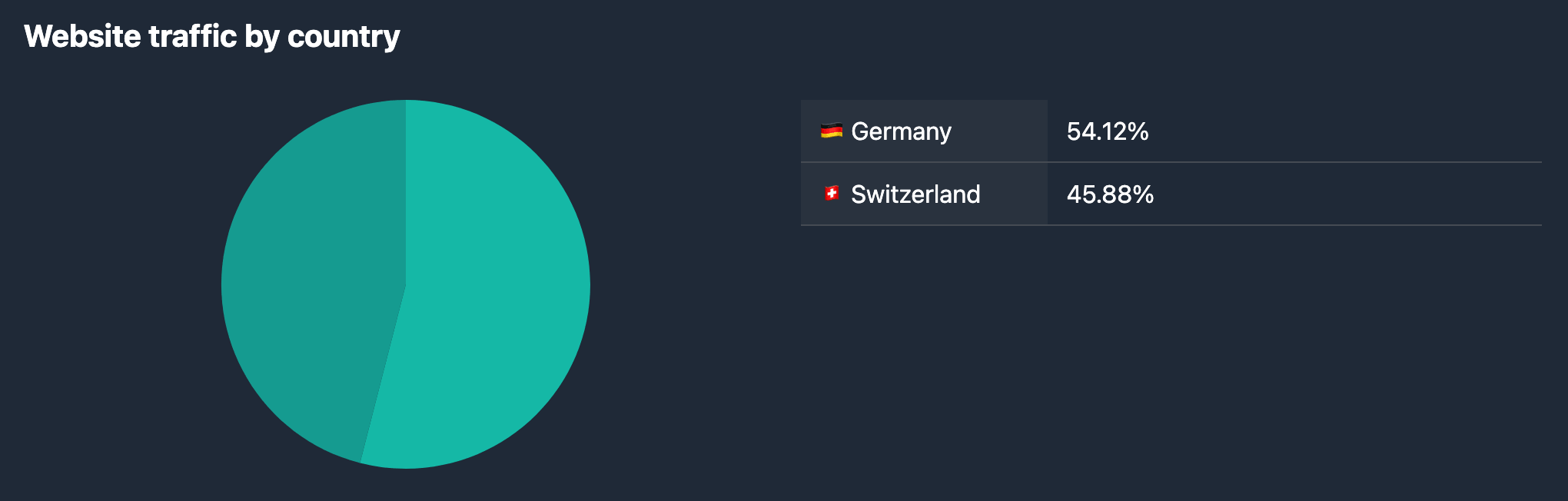
When the report includes country-level traffic shares (top country shares), a heading appears (e.g. “Top countries” or localized) and again two columns.
Left column: pie chart
Pie chart — traffic share by country in percent. Segments are labeled with country names (UI language or reference data). Colors use one palette. Hover shows a tooltip with name and percent.
Right column: country list
Rows: country flag (emoji), country name, and traffic share in percent (two decimals and %). Usually ordered from largest to smallest share. Handy to match exact values with the chart.
Filtering by SimilarWeb data in search
Metrics from the report (visits, Last Traffic period, country traffic shares, source shares, and other fields available in the filter panel) can be set when selecting domains in database tables — in the SimilarWeb filter block. Field details and examples are in SimilarWeb filters.
Summary
- The SimilarWeb tab shows a chart of estimated monthly visits by month.
- Block for the chosen month: traffic sources (bar chart) and engagement (Visits, Visits per day, Pages per visit, Time on site, Bounce rate).
- When data exists — top countries: pie chart and list with percent shares.
- You can filter search in databases with SimilarWeb parameters — see SimilarWeb filters.