
A domain history lookup answers one question before you buy an expired domain: what was this name used for, and will that past follow it to your project? No single domain history checker answers it in full. You need five checks: registration data (RDAP or WHOIS), Wayback Machine snapshots, topic changes, spam signals and SEO metrics. This post is for SEOs, link builders and domain investors who screen expired names. We ran all five checks on two real expired .com domains. One had nearly twenty years on the same topic. The other ended up as a Philippine casino keyword page, and its SEO metrics showed nothing at all.
Table of Contents
- Table of Contents
- What a domain history lookup can and can't show
- The two domains we checked
- 1. Check registration history with RDAP or WHOIS
- 2. Read the Wayback snapshot pattern before the pages
- 3. Look for topic changes in three snapshots
- 4. Check the archive for spam signals
- 5. Check that the metrics match the story
- A domain history checklist you can reuse
- FAQ
- Before you bid
What a domain history lookup can and can't show
People usually start with WHOIS, because "domain name history" sounds like an ownership record. Registration data tells you less than people expect. RDAP (Registration Data Access Protocol) is now the official source of gTLD registration data, replacing the older WHOIS services, according to ICANN. ICANN describes RDAP as giving access to current registration data. You get today's registrar, status, nameservers and dates. You do not get a log of past owners or of what the site published.
The content history lives somewhere else, mostly in the Wayback Machine. Metrics tools add a third view: links and anchors that other sites pointed at the name. A sound domain history check reads all three and looks for places where they disagree.
The two domains we checked
We picked both names from the expired list in Karma.Domains. They are .com domains with at least ten years in the archive and at least one recorded content change:
- mundomudanzas.com, a Spanish directory of moving companies;
- noticiacanaria.com, which started as a Canary Islands news site.
Every number below comes from that day's lookups: the Verisign RDAP service for .com, the Wayback Machine's CDX API and archived pages, and live checks through Karma.Domains. Registration and archive data change, so a lookup run on another day may differ slightly.
1. Check registration history with RDAP or WHOIS
Open any RDAP client (ICANN's lookup tool at lookup.icann.org works) and read four fields: the registration (creation) date, the expiration date, the status and the nameservers.
The .com registry returned for mundomudanzas.com:
- registration date 28 August, nearly twenty years earlier;
- expiration date 28 August of the lookup year;
- status "redemption period";
- nameservers SUSPENDED1.PLAINDNS.NET and SUSPENDED2.PLAINDNS.NET;
- registrar Nominalia Internet SL.
The early creation date matters most. When a domain drops and someone registers it again, the creation date starts over. An early creation date on a name that just expired means one registration was renewed for twenty years and never lapsed. That fits a long-running business site.
The status matters too. Under ICANN's Expired Registration Recovery Policy, a deleted gTLD registration enters a 30-day Redemption Grace Period. During that period, DNS resolution is disabled and the previous registrant can still ask the registrar to restore the name. At the time of our lookup, mundomudanzas.com is on the expired list, but nobody can buy it yet. It may be restored, or it may move on to deletion.
For noticiacanaria.com, RDAP returned a 404: the registry has no record of the name. That is normal for a domain that has fully dropped, and it means registration data can't tell you anything about the past. The previous creation date, registrar and nameservers are gone from the public record. Third-party historical WHOIS archives sometimes kept copies. For most expired-domain decisions, the archive check below gives you more anyway.
One more limit: the registry response for mundomudanzas.com named the registrar but contained no registrant contact. Don't expect a domain name history lookup to tell you who owned a site. Expect dates and status.
2. Read the Wayback snapshot pattern before the pages
Start with capture density over time, before you open a single snapshot. Our domain age checker shows the first and last Wayback capture, the total count and a month-by-month chart for several domains at once. That is usually enough to sort a shortlist into "steady", "gappy" and "strange".
Here is what it showed for our two domains:
| mundomudanzas.com | noticiacanaria.com | |
|---|---|---|
| First capture | October, nearly twenty years earlier | March, about a decade earlier |
| Last capture | December of the prior year | November of the prior year |
| Total captures | 665 | 69,784 |
| Pattern | Steady captures across nearly twenty years, with one quiet stretch a few years in | Light for the first couple of years, almost silent for the next few, then 1,252 in one November and bursts of several thousand a month afterward |
A higher number doesn't mean a better domain. noticiacanaria.com had between 1 and 9 captures a month in its quieter early years. It had a single capture in one later year. Then one November shows 1,252 captures, and several following months show more than 3,000. A jump like that usually means the site suddenly generated a large number of URLs. That is worth explaining before you go any further.
If you prefer raw data, the Wayback CDX API returns one row per capture. This query collapses the results to one row per year and adds the HTTP status and a content hash:
https://web.archive.org/cdx/search/cdx?url=example.com&fl=timestamp,statuscode,digest&collapse=timestamp:4
When the digest changes between rows, the page content changed. A digest that repeats on many 301 rows usually belongs to an empty redirect body (both of our domains had the same one), so it says nothing about content.
For mundomudanzas.com, the www homepage has at least one 200 capture in every year across nearly two decades. For noticiacanaria.com, the yearly rows for the bare domain show a 403 in one mid-archive year and only 301 and 302 responses from the later years on.
3. Look for topic changes in three snapshots
You don't need to scroll through every capture. Open the oldest useful snapshot, one from the middle and the latest one. Then add one from each point where the pattern from step 2 changes sharply.
mundomudanzas.com stayed on topic for all three:
- Earliest October capture: the page is titled "MundoMudanza.com" and carries a Spanish data protection law notice.
- Mid-period January capture: the description reads "La web de empresas de mudanzas y guardamuebles…" (English: "The website of moving and furniture storage companies…"). The page lists moving company discounts, featured companies and dated customer reviews.
- Latest December capture: the headline reads "Encuentra todo lo que necesitas para tu mudanza" (English: "Find everything you need for your move"), with "443 Ofertas de Mudanzas" (English: "443 moving offers").
The language, the topic and the business model stayed the same for nineteen years.
noticiacanaria.com looks like it changed hands at least once:
- Early January capture: "Noticias de Canarias – Ultimas noticias" (English: "Canary Islands news: latest news"). The page was mostly viral clickbait in Spanish, with a few local pieces such as mojo sauce recipes and Canary Islands history.
- Later January capture: the title has switched to English: "CANARY NEWS SOURCE – An information of the latest news today". The homepage is one generic essay about journalistic writing. That looks like a placeholder built to fit the old name.
- 2 January capture after that: the capture is a 302 redirect to
/wp-admin/setup-config.php, a WordPress install that nobody had finished setting up. - Most recent January capture: the homepage is a long list of Philippine online casino, slot and cockfighting betting keywords, with Chinese interface labels.
Over ten years the language, the topic and the audience all changed, and the last owner used the name for gambling keywords.
4. Check the archive for spam signals
Spam history rarely announces itself in the domain name, so look at what the archived pages actually say. These are the patterns we look for:
- Off-topic commercial keywords: casino, betting, pharma, loans, adult or replica goods on a domain that was something else.
- Mass-generated pages: capture spikes like the one in step 2, long dated lists of keyword titles, and template pages that differ only by keyword.
- Machine-written filler: the most recent January capture of noticiacanaria.com still contains the line "Sure! Here's a 700-word article based on the title you provided", left behind by a text generator.
- Unrelated redirects: long stretches of 301 or 302 responses to other domains. These can mean the name was used to pass link equity elsewhere.
- Abandonment markers: parking pages, unfinished CMS installs and long runs of 403 or 5xx errors.
Google's spam policies define "expired domain abuse" as buying an expired domain and repurposing it "primarily to manipulate search rankings by hosting content that provides little to no value to users". One of Google's own examples is "Casino-related content on a former elementary school site". A former local news site turned casino keyword page fits that description closely.
Karma.Domains reports include a Wayback summary: how many times the content changed, which languages appeared and how often each HTTP status was returned. For noticiacanaria.com, the report showed 7 content changes, 61.2% Spanish and 38.8% English pages, and a 20.2% share of 403 responses. We still open the snapshots ourselves, because the summary tells you where to look and the pages tell you why.
5. Check that the metrics match the story
Metrics come last because they make the most sense once you know the history. Authority scores, backlinks and spam scores are third-party signals. Use them to confirm or contradict what the archive showed you.
For mundomudanzas.com, the live Moz check returned a Domain Authority of 25, a Spam Score of 3%, 592 backlinks and 126 referring domains. At least 41% of a 49-link anchor sample used the brand ("Mundomudanzas.com", "mundomudanzas", "Mundo Mudanzas"). Most of the rest were Spanish moving phrases such as "contratar una empresa de mudanzas" (English: "hire a moving company") and "montaje de muebles" (English: "furniture assembly"). The links agree with the archive: same topic, same language, mostly branded.
For noticiacanaria.com, Moz returned no data at all: no authority, no Spam Score, no backlinks, no anchors. An empty metrics panel is easy to misread as "clean" or "fresh". Here it meant the opposite. If you had screened on metrics alone, you would have seen a blank, low-risk domain and missed four years of repurposing that four archived pages made obvious.
This is why we read metrics last: they show what other sites point at a domain, and the archive shows what the domain itself did.
A domain history checklist you can reuse
| Step | What to check | Red flags |
|---|---|---|
| 1. Registration | Creation date, status, expiry, nameservers (RDAP) | Recent creation date on a "10-year-old" name; status still in redemption |
| 2. Wayback pattern | First and last capture, monthly density | Multi-year gaps; sudden jumps to thousands of captures |
| 3. Topic changes | Oldest, middle and latest snapshot, plus each pattern break | New language, new niche, placeholder content |
| 4. Spam signals | Keywords, generated pages, redirects, filler text | Casino, pharma or adult terms; mass keyword lists; unrelated redirects |
| 5. Metrics | Authority, Spam Score, referring domains, anchors | Anchors off the domain's original topic; empty data on a domain with a busy archive |
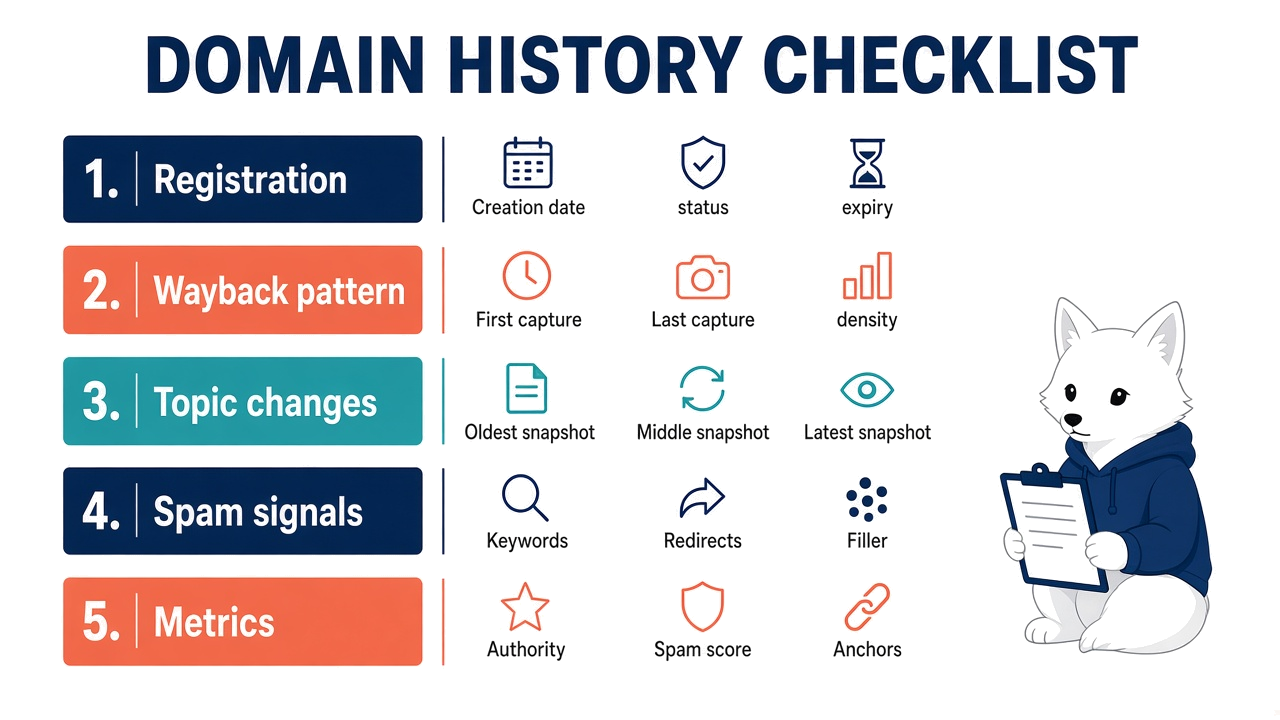
For a shortlist of ten, run steps 1 and 2 on everything, then open snapshots only for names whose patterns look plausible. That keeps the manual reading for the domains that have earned it.
FAQ
What is a domain history lookup?
It is a check of what an expired domain was used for before you buy it. A full lookup combines registration data (RDAP or WHOIS), archived snapshots from the Wayback Machine and SEO metrics such as backlinks and anchors.
Can a domain history checker show previous owners?
Usually not. RDAP shows current registration data, and the .com registry response we read included the registrar but no registrant contact. Some third-party services keep archives of old WHOIS records, but the archived content usually tells you more about how the domain was used.
How do I check domain history for free?
Read the current registration record in an RDAP client such as ICANN's lookup tool, then look at the domain in the Wayback Machine, either through the calendar view or through the CDX API query shown above. Compare at least three snapshots from different years.
Does a domain keep its history after it drops?
The archive does. Wayback captures stay online after a domain expires, which is why noticiacanaria.com still has a readable past. Registration data doesn't: once a domain is deleted, RDAP returns nothing, and a new registration starts with a new creation date.
How far back should I check?
To the first capture. Problems often sit in the middle years, as with noticiacanaria.com, where the change began after a four-year quiet period.
Before you bid
Take one domain from your current shortlist and run the five checks in order: RDAP, capture pattern, three snapshots, spam signals and then metrics. If the five views tell the same story, the domain deserves a closer look at its backlinks and at how it fits your project. If they contradict each other, find out why before you spend anything on it.