
We built the Karma.Domains browser extension so you can check a domain from the page you're already on, whether that's a Google result, an auction lot, or a site you're vetting for a link. This post is for SEOs and link builders who run quick domain checks all day. I'll cover what the popup checks, how free checks and account credits work together, why a cached result doesn't cost twice, and when the full report is the better choice.
I kept noticing how much friction surrounded that small job. Copy the domain. Open another tab. Find the right checker. Paste the name. Wait for the result. Return to the original page and remember why the domain was interesting.
Each step is minor. Repeat the sequence across a prospect list or an auction session and it becomes the work.
We have spent the past few months shortening that route in Karma.Domains. First, we connected our free domain tools to user accounts and account credits. Then we rebuilt our browser extension around those same checks. The difficult part was keeping the experience consistent: one account, one daily free allowance, the same credits, and no second charge for a result we already had.
Table of Contents
- Table of Contents
- The first version lived on the website
- A daily limit should not reset the workflow
- The next useful place was the browser: a domain checker extension
- We moved the workflow, not a second billing system
- A cached result should not cost twice
- What the shorter workflow looks like
- The popup is a screening layer
- FAQ
- Convenience is mostly the work that disappears
The first version lived on the website
Our free tools began as focused pages for quick questions. The Domain Authority Checker compares authority and link signals. Other tools cover website traffic, backlinks, anchor text, spam score, registration expiry, WHOIS, DNS, domain age, cached pages, and page counts.
That format works well when someone arrives with a list. Paste several domains, compare the rows, copy the results into a spreadsheet, and move on. A full Karma.Domains report would be excessive when the question is simply, “What does the backlink profile look like?” or “When does this registration expire?”
We made the public tools usable without an account because the first check should be quick. A visitor can check up to 10 domains per day across the free tools. The trouble appeared when the free allowance ran out.
A daily limit should not reset the workflow
The original boundary was too abrupt. Karma.Domains users already had credits in their profiles, but the public tools and the account balance behaved like separate systems. A signed-in user who reached the daily allowance could have credits available and still hit the same stop as a guest.
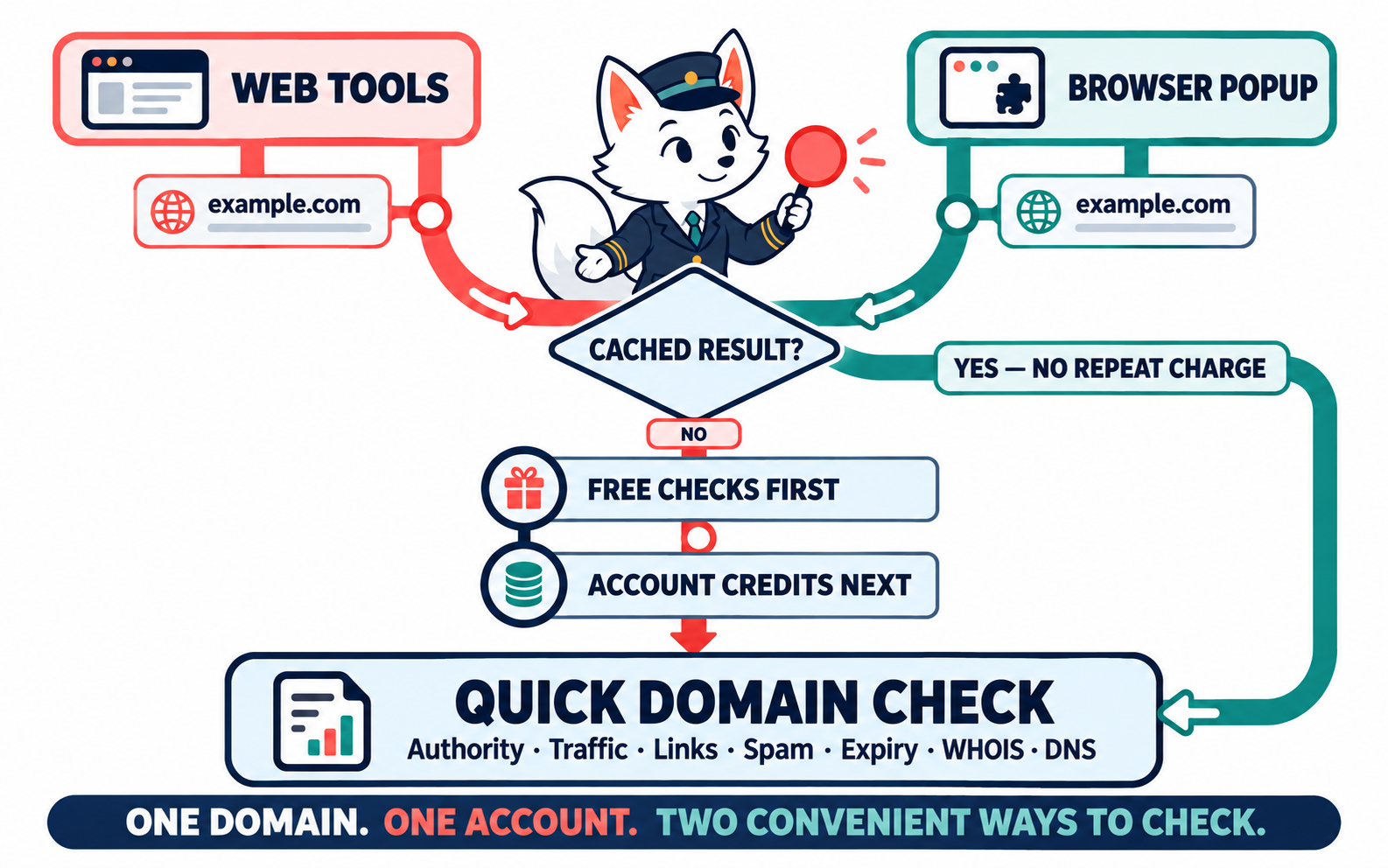
We connected the two paths. Now the tool uses the daily free allowance first, then draws from the signed-in user's credits. One domain check costs one credit after the free allowance. Purchased credits do not expire.
The split also works inside a batch. If someone has three free checks left and submits 10 domains, the first three use the remaining allowance and the other seven use account credits. The person does not need to divide the list, run two jobs, or move to another screen.
Guests still get the simple public tool. Signing in turns the quota boundary into a continuation instead of a dead end. That change gave us the model we later used in the extension.
The next useful place was the browser: a domain checker extension
Our extension started as a search-result helper. It placed domain age and Karma Metric information beside results in Google, Bing, and DuckDuckGo. That saved a click during research, but it covered only the moment before someone opened a site.
After the click, the old routine returned. A user looking at a potential outreach partner, an auction page, or a competitor site still had to leave the page for every other check.
The extension already knew the domain in the active tab. That made the next step fairly obvious: let the user run the same focused checks from the browser.
We chose a popup for this job. It appears when requested, gives the answer, and disappears without changing the page layout. A persistent panel would take up space on every site, even though most checks last only a few seconds.
The current Karma.Domains SEO Chrome extension has three areas: Karma Metric, Checks, and Account. Under Checks, the user can run:
- Domain Authority;
- Website Traffic;
- Backlinks;
- Anchor Text;
- Spam Score;
- Domain Expiry;
- WHOIS;
- DNS Lookup;
- Domain Age;
- Website Cache;
- Page Count.
The popup shows a compact result. Each checker also includes an Open full tool link with the current domain already filled in. The quick answer stays in the browser, while the detailed view remains available when the domain deserves more attention.
We moved the workflow, not a second billing system
Putting checker buttons in a popup would have been easy. Creating a separate extension account, quota, or credit balance would have made the product harder to understand.
We kept the browser extension attached to the existing Karma.Domains account. The sign-in flow opens Karma.Domains, asks the user to approve access, and returns to the extension. There is no API key to copy into the browser.
Under the hood, the extension uses a standard OAuth sign-in. For the user it comes down to three steps: click Sign in, approve the connection, and keep working. The extension can then show the account and balance, use the daily free allowance first, and draw from account credits when needed.
Guest checks still work. Signing in adds continuity rather than creating a requirement before the first result.
A cached result should not cost twice
This was the detail that mattered most, and we only caught it during development.
The tools already cached results so that we would not repeat the same provider requests every time someone checked a domain. The extension added its own local cache as well. A successful result stays available in the browser for a while, so reopening the popup does not start the work again.
Early in the integration, however, billing happened before the server checked whether it already had the result. The response was fast because it came from cache, but the request could still consume a free check or a credit.
That behavior made no sense from the user's side. We changed the order. The server now checks the result cache first. If it has a usable result, the response is returned without consuming the daily allowance or account credits. If it misses, the normal order applies: free checks first, account credits next.
This rule matters because the website and extension share the same tool layer. A check started on a landing page may help a later request from the extension, and vice versa. The user should not have to know which interface populated the cache.
The popup still has a Refresh action. Recent results are useful for screening, but traffic, backlinks, DNS records, and registration data can change. A user can ask again when freshness matters.
What the shorter workflow looks like
The finished extension supports several kinds of research without trying to turn the popup into a full domain report.
Reviewing search results
Domain age and Karma Metric appear beside results in supported search engines. That gives the user historical context before opening a page. If a result looks relevant, the site can be opened and checked further from the popup.
This is useful when an old domain appears in research and its apparent authority needs context. A long archive history or a solid metric can justify another look. Neither one proves that the current site is trustworthy, so the extension keeps the deeper checks one click away.
Qualifying a link prospect
An SEO specialist can open a prospective placement and check authority, estimated traffic, backlinks, anchor text, and spam score without leaving the site. The popup is a first pass: does the domain deserve a row in the shortlist, or can it be rejected immediately?
If the signals are mixed, Open full tool moves the domain into the larger view. At that point, the specialist can compare more detail and inspect the site's history before approving the prospect.
Inspecting an auction candidate
A domain investor may encounter a name on a marketplace before opening Karma.Domains. The extension can provide a quick look at authority, links, archive-based Karma Metric, registration data, and DNS state from the current tab.
That is enough to decide whether deeper due diligence is worth the time. It is not enough to set a bid. Auction price, historical content, trademark risk, backlink quality, and the investor's own strategy still require a full review.
The popup is a screening layer
We deliberately kept the result compact. The extension is meant to answer the first question and preserve context. A full report has a different job.
Authority scores are third-party signals. They do not prove a clean history or a good acquisition. Estimated traffic can be stale or cover a different period from another provider. WHOIS data may be incomplete. A cached result is efficient, but a time-sensitive decision may call for a refresh.
For a handful of domains, the popup may be all someone needs. For a shortlist, the full free tool is easier to compare. For a purchase, link placement, redirect, or PBN decision, I would still open the complete Karma.Domains report and inspect the historical evidence.
The point of the extension is to delay that expensive review until a domain has earned it.
FAQ
Can I check a domain without leaving the page?
Yes. Open the extension popup on any site and run a checker for the domain in the active tab. The result appears in the popup, and Open full tool takes you to the full checker if you need more detail.
Does a cached result use a free check or a credit?
Neither. If a usable result is already cached, it is returned without using the daily allowance or account credits. Use Refresh when you need fresh data.
What happens if my free checks run out in the middle of a batch?
The remaining free checks are used first, and the rest of the batch uses account credits if you are signed in. You do not need to split the list.
Do I need an API key to use the browser extension?
No. You sign in to Karma.Domains and approve access; there is no key to copy into the browser.
When should I open the full report instead of the popup?
Before a purchase, link placement, redirect or bid. The popup is a screening layer; the full Karma.Domains report shows the historical evidence.
Convenience is mostly the work that disappears
The project began with a billing gap on our free tools and ended with a much shorter route from seeing a domain to understanding it.
The website remains useful for batches and side-by-side comparison. The browser popup handles the domain already in front of the user. Both use the same account and follow the same order for free checks and credits. Cache-aware billing prevents a stored result from costing a second time.
That is what we wanted the extension to feel like: less copying, less switching, and fewer repeated actions. When a domain survives the quick check, the full report is still there. The difference is that the user reaches it with a reason.