- How Ahrefs filters work
- Domain Rating (DR) filter
- URL Rating (UR) filter
- Ahrefs Rank (AR) filter
- Combining Ahrefs filters
- Input formats and field limits
- Common issues and what to do
- Usage tips
How Ahrefs filters work
Ahrefs filters let you select domains by Ahrefs metrics: Domain Rating (DR), URL Rating (UR), and Ahrefs Rank (AR). For each metric you set a range with min and max (a dash appears between them).
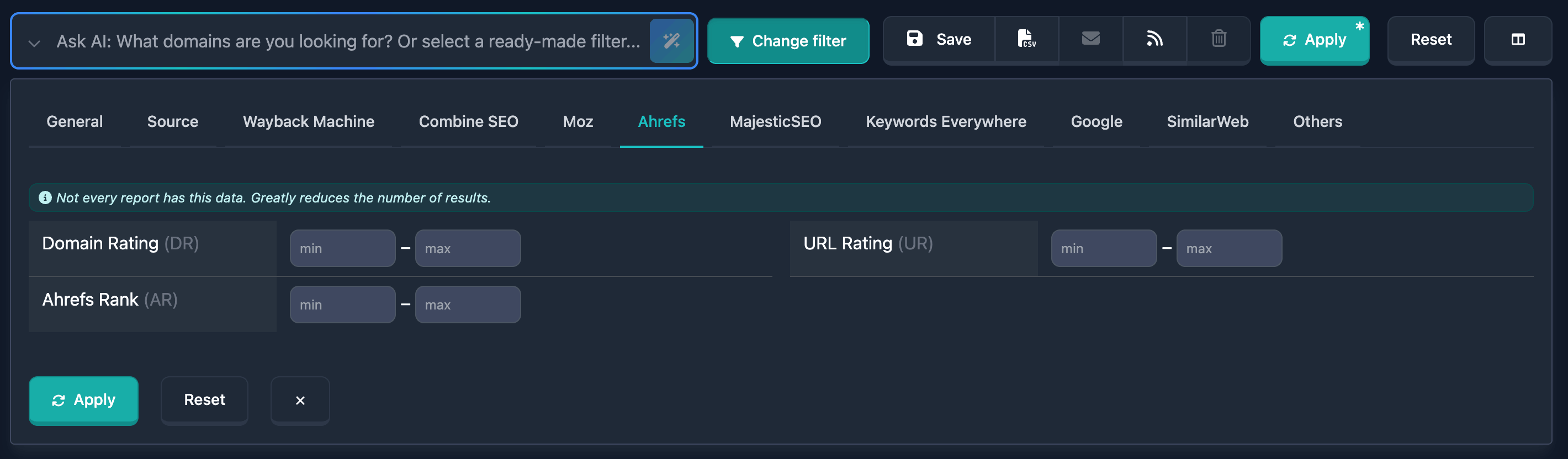
Important: At the top of the Ahrefs filter block there is a hint: “Not every report has this data. Greatly reduces the number of results.” — Ahrefs data is not available for all reports; strict conditions on these fields narrow results a lot.
Domain Rating (DR) filter
Domain Rating (DR) is a generalized measure of a domain’s backlink profile strength on a scale from 0 to 100 (higher means a stronger domain in Ahrefs). In the UI you set min and max with allowed values 0–100.
How to use
- Open the Ahrefs filter block in the report’s filter panel
- Find the Domain Rating (DR) row
- In min set the lower bound and in max the upper bound (you can fill only one field or both)
Notes
- High DR (e.g. 50+) usually means a notable link profile; low DR — a weak or new profile
- Compare DR with other filters and remember that data is not available for every domain
Examples
Example 1: Moderately strong domains 30–60 — min: 30, max: 60.
Example 2: Only with clear authority from 40 — min: 40, leave max empty (or 100 if you want an explicit ceiling).
Example 3: Cap “too strong” domains for your use case — min: 0, max: 35.
URL Rating (UR) filter
URL Rating (UR) is the strength of a specific page (URL) on a 0–100 scale in Ahrefs. In the UI it is again min and max in the 0–100 range.
How to use
- Find the URL Rating (UR) row in the Ahrefs block
- Set min, max, or both the same way as for DR
Notes
- UR reflects the page’s link weight, not the whole domain
- Useful when landing or home page strength in results matters
Examples
Example 1: Page not below a rough threshold — min: 20, max not set.
Example 2: Narrow band 10–40 — min: 10, max: 40.
Ahrefs Rank (AR) filter
Ahrefs Rank (AR) is a global site rank in Ahrefs: the lower the number, the stronger the site (typically 1 is the best rank). In the UI you set min and max; the lower bound is not below 0, and for max there is no hard ceiling in the UI (unlike DR and UR, where the maximum is 100).
How to use
- Find the Ahrefs Rank (AR) row
- Set min and max to define the desired rank “corridor” (remember: a smaller number means a higher position in the rank)
Notes
- To select very strong domains you want small AR values (e.g. top of the rank)
- To exclude the heaviest giants and keep a middle segment, combine min and max deliberately
Examples
Example 1: Roughly “top by AR” — min: 1, max: 1000 (tune numbers to your task and available data).
Example 2: Exclude the bottom of very large ranks — set max to cut off sites that are too weak in the global rank.
Combining Ahrefs filters
You can set DR, UR, and AR at the same time. Then the domain must meet all specified conditions (AND between different Ahrefs metrics in the search). Ahrefs filters can also be combined with the rest of the report filters; useful condition sets can be saved.
Combination example
Goal: Domains with noticeable DR and UR, but not only “absolute leaders” in global rank.
In the UI: DR min 25, max 70; UR min 15; AR set a range that matches your segment in the global rank. If results are too thin, relax one condition.
Input formats and field limits
- Domain Rating (DR): min and max, values from 0 to 100 inclusive
- URL Rating (UR): min and max, values from 0 to 100 inclusive
- Ahrefs Rank (AR): min and max, lower bound not below 0; max has no 100 ceiling (unlike DR and UR)
Enter integers in the numeric fields. An empty field means that side of the bound is not set; together with the other field filled, that gives a one-sided condition.
Common issues and what to do
No or very few results
Why: The combination of DR, UR, AR, and other filters is too tight; or most reports lack Ahrefs data (see the block hint).
What to do: Remove or relax Ahrefs conditions one field at a time until results are enough. Check that metrics do not redundantly duplicate each other (e.g. very high DR and very low AR at once).
Unclear why a domain is missing
Why: The report may have no Ahrefs metrics for that domain — then DR, UR, or AR filters will exclude it.
What to do: Heed the warning at the top of the block. If needed, temporarily turn off Ahrefs filters and use other signals in the report.
Confused which is “better” for Ahrefs Rank
Why: For AR, a smaller number usually means a better global rank; it is not a “higher is better” scale like DR/UR.
What to do: Set min/max so the segment you want falls in range; if unsure, narrow the range and watch how the result count changes.
Usage tips
-
Wide first, then tighten: start with one metric (e.g. only DR), then add UR and AR if results allow.
-
Hint about data: the phrase “Not every report has this data…” refers to Ahrefs availability in reports; it is the main reason for empty or short lists under strict filters.
-
DR and UR: DR is domain-wide, UR is page-level; different tasks care about different metrics.
-
AR: use it for selection by global “weight” in Ahrefs, remembering that a smaller rank value is usually better.
-
Saving presets: stable combinations are handy to save so you do not re-enter ranges every time.