- How Majestic filters work
- Trust Flow (TF) filter
- Citation Flow (CF) filter
- Majestic Ratio filter
- Backlinks filter
- Referring Domains filter
- Combining Majestic filters
- Troubleshooting
- Tips
How Majestic filters work
Majestic filters let you search domains using metrics from Majestic SEO: Trust Flow (TF), Citation Flow (CF), Majestic Ratio (TF divided by CF), backlink count and referring domains.
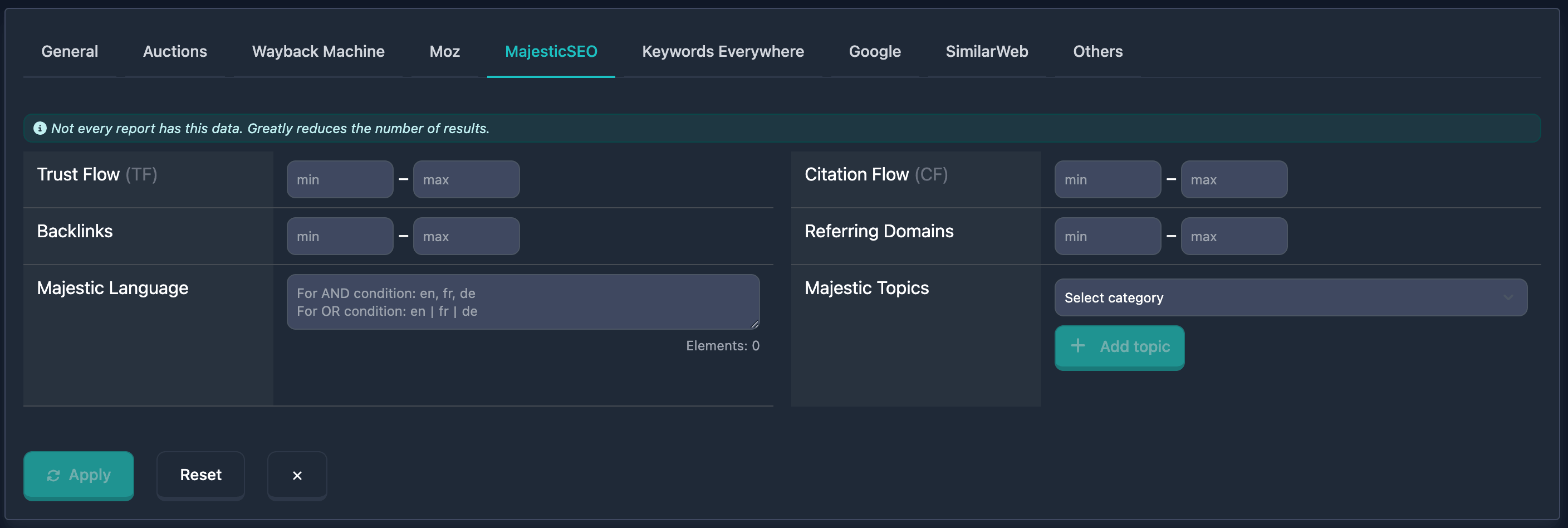
Important: At the top of the Majestic block you’ll see: “Not every report has this data. Greatly reduces the number of results.” — keep that in mind when using these filters.
Trust Flow (TF) filter
Trust Flow (TF) is a Majestic metric: backlink quality based on trust in referring domains. Values run from 0 to 100; higher means better links. In the UI you set min and max.
How to use
- Find Trust Flow (TF) in the Majestic filters block
- In min, enter the minimum (0–100)
- In max, enter the maximum (0–100); a dash appears between the fields
- You can fill min only, max only, or both for a range
Notes
- High TF (40+) usually indicates quality backlinks; mid (20–40) moderate quality; low (0–20) a weak profile. TF matters more than Citation Flow for quality.
Examples
Example 1: High TF (40–100) — min: 40, max: 100.
Example 2: Very high TF (from 50) — min: 50, leave max empty.
Citation Flow (CF) filter
Citation Flow (CF) is a Majestic metric: the volume of backlinks to the domain. Values run from 0 to 100. In the UI: min and max.
How to use
- Find Citation Flow (CF) in the Majestic block
- Enter min and max (0–100)
- You can use min only, max only, or both
Notes
- CF reflects link quantity, not quality. High CF (40+) means many links; mid (20–40) moderate; low (0–20) few.
Examples
Example 1: High CF (40–100) — min: 40, max: 100.
Example 2: Moderate CF (20–40) — min: 20, max: 40.
Majestic Ratio filter
Majestic Ratio is Trust Flow divided by Citation Flow, stored with two decimal places. 0.80 means Trust Flow is close to Citation Flow. 0.20 means many citations and little trust. The value can be above 1 when Trust Flow is higher than Citation Flow (40 / 20 = 2.00). It is empty when Citation Flow is 0 or either number is missing.
In the UI you set min and max with a step of 0.01. Values stay between 0 and 100: Trust Flow and Citation Flow are 0–100, so their ratio cannot be higher.
How to use
- Find Majestic Ratio in the Majestic block, under Citation Flow
- Enter min and/or max
- You can use min only, max only, or both
Examples
Example 1: Trust close to citations — min: 0.8, leave max empty.
Example 2: A band of ratios — min: 0.2, max: 0.8.
Backlinks filter
The Backlinks filter selects domains by backlink count from Majestic. The UI uses min and max (no 100 cap like TF/CF).
How to use
- Find Backlinks in the Majestic block
- min = minimum backlinks, max = maximum (dash between fields)
- min only, max only, or both
Notes
- Shows total links to the domain; a large number often means popularity. Quality beats quantity.
Examples
Example 1: Many backlinks (from 1000) — min: 1000, leave max empty.
Example 2: Moderate (100–1000) — min: 100, max: 1000.
Referring Domains filter
Referring Domains selects domains by how many unique referring domains Majestic reports. min and max in the UI.
How to use
- Find Referring Domains in the Majestic block
- Enter min and/or max (0 upward; no hard upper limit in the UI)
- min only, max only, or both
Notes
- Many referring domains often means a more natural, diverse link profile.
Examples
Example 1: Many referring domains (from 100) — min: 100, leave max empty.
Example 2: Moderate (10–50) — min: 10, max: 50.
Combining Majestic filters
You can combine Majestic filters with others for tighter search. With multiple filters active, logic is AND — the domain must match all conditions. You can save useful combinations.
Example
Goal: High TF (from 40), moderate CF (20–40), many referring domains (from 50).
In the UI:
- Trust Flow (TF): min 40, max 100
- Citation Flow (CF): min 20, max 40
- Referring Domains: min 50
Results only include domains matching all of the above.
Troubleshooting
No results
Cause: Conditions too strict, or Majestic data missing for many domains (see the block hint).
Fix: Relax or turn off filters step by step (widen TF/CF/Backlinks/Referring Domains ranges) to see when results appear. Use other filters if needed.
Few results because of Majestic coverage
Cause: Not every domain has Majestic data — filters only apply where data exists.
Fix: Remember the note at the top (“Not every report has this data…”). For other domains, rely on the rest of the search filters.
Tips
-
TF + CF: High Trust Flow with moderate Citation Flow helps find domains with quality links. TF close to or above CF is often good. Majestic Ratio is that comparison as a number: min 0.8 keeps names where Trust Flow is at least 80% of Citation Flow.
-
Data availability: The block warns that not every report has Majestic data — that reduces result counts.
-
Referring Domains: A high count often means a more natural link profile.