- How AI search works
- How to use AI search
- What the AI understands
- How the AI behaves
- Query format
- Usage examples
- Using AI on top of an existing filter
- Limitations and notes
- Usage tips
- Common errors and fixes
- Integration with saved filters
How AI search works
AI filter search lets you build complex domain search filters by simply describing what you want in natural language. The AI analyzes your request and automatically configures all necessary filter parameters, so you do not have to fill many fields by hand.
How to use AI search
Step 1: Open the AI search field
- Find the input field with a gradient border at the top of the filter panel
- The field has an animated gradient and a magic-wand icon indicating AI functionality
- Click the input field to focus it
Step 2: Enter a natural-language query
- Describe the domains you are looking for
- The query can be in any language and free form
- Maximum query length is 400 characters
- Example queries:
Domains for a seafood restaurant in MilanFresh domains with traffic from the USShort domains with high KarmaScore
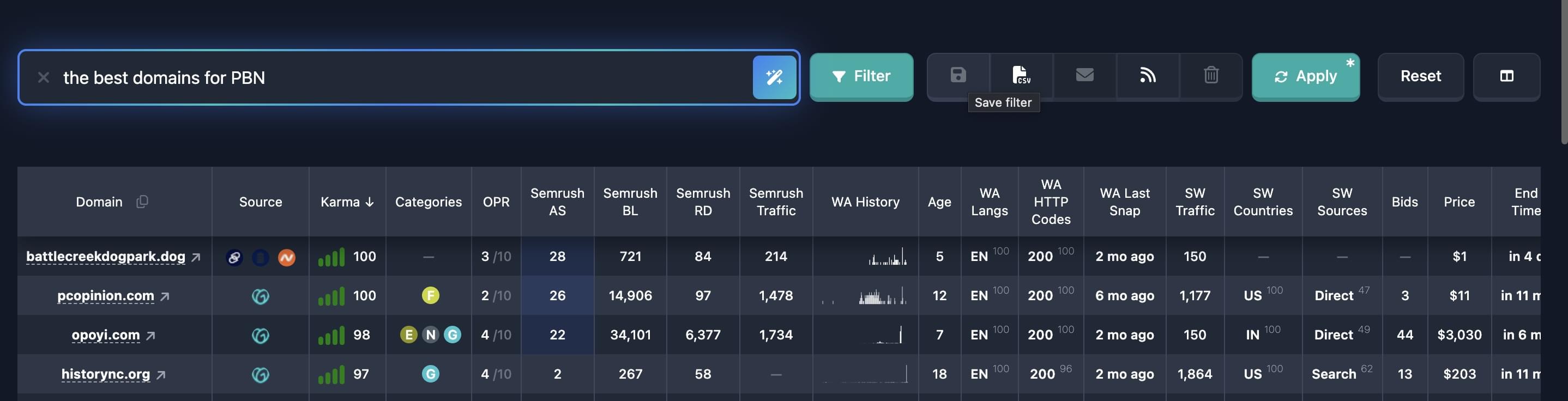
Step 3: Apply the AI query
- Click the button with the magic-wand icon to the right of the input
- Or press
Enter - Wait for processing (a loading indicator is shown)
- The AI automatically configures all necessary filters and applies them
Step 4: Review the result
- After the AI filter is applied, open the filter panel
- Check which parameters were set automatically
- Adjust parameters manually if needed
- Save the filter for reuse if you want
What the AI understands
AI search understands different kinds of requests and automatically decides which filters to apply:
Topic and category search
The AI recognizes mentions of topics, themes, or content types and picks matching categories and keywords.
Examples:
Domains for a restaurant→ categoryRestaurants & Bars, restaurant-related keywordsDomains about cryptocurrencies→ finance and investment categories, cryptocurrency keywordsDomains for a fitness club→ categorySports / Fitness & Weight Lifting
Language and country search
The AI detects language and country from your query and sets the corresponding filters.
Examples:
Domains in English→ language filterenwith at least 70% shareDomains for a fitness club in Germany→ languagede, TLDscom net org deDomains with traffic from the US→ SimilarWeb country filter with at least 50% share
Technical parameter search
The AI understands requirements for technical domain characteristics.
Examples:
Short domains→ maximum domain lengthDomains with letters only→ no digits or hyphensFresh domains→ added in the last 24 hoursClean domains→ no 403 errors, no ideographs, no redirects
Quality metric search
The AI recognizes requirements for domain quality and authority.
Examples:
Authoritative domains→ minimum Karma Domain Metric 10Domains with strong SEO→ high Karma Score, minimum age, clean domainsDomains for PBN→ age at least 2 years, minimum Moz metrics
SimilarWeb data search
The AI configures SimilarWeb filters based on traffic mentions.
Examples:
Domains with high traffic→ minimum visit countDomains with traffic from a specific country→ SimilarWeb country filters
Auction search
The AI recognizes auction mentions and sets the corresponding source filters.
Examples:
Domains from GoDaddy auction→ auction source filter
How the AI behaves
Automatic parameter selection
The AI only chooses parameters that clearly follow from your query. If you do not mention topic, language, or country, those parameters are not added to the filter.
Minimalist approach
The AI uses the minimum number of parameters needed to match your query. That helps get more results and avoids overloading the filter with extra conditions.
Combining parameters
The AI can combine different filter types in one query:
- Topic + language + country:
Domains for a seafood restaurant in Milan - Technical + metrics:
Short authoritative domains - Time + quality:
Fresh domains with high Karma Score
Date handling
The AI automatically computes relative dates from the current date. For example, fresh domains becomes a range of the last 24 hours from now.
Query format
Recommended format
Describe your request naturally, as if explaining to a person what you want. Specific values are allowed and helpful — numbers, thresholds, topics, countries, etc. help the AI tune filters more accurately:
- ✅
Domains for a seafood restaurant in Milan - ✅
Fresh authoritative domains about cryptocurrencies in English - ✅
Short domains with traffic from the US - ✅
Karma Score from 70, SimilarWeb traffic from 10,000 visits
What to avoid
Try not to build the query from many negations (“do not show”, “avoid”, “without”, “exclude”). The AI may interpret them backwards and put into filters what you wanted to exclude.
- ❌
Domains without casino topic— the AI may treat the topic as “casino” - ❌
Avoid domains with redirects and without traffic— high risk of mixing up conditions
Prefer positive wording: what you need, not what to avoid:
- ✅
Domains with high authority and low spam score - ✅
Topics: restaurants, tourism, health(instead of a long list of “not casino, not betting…”)
Mention only what matters. If a topic is unwanted or a parameter does not matter — do not put it in the query. Extra conditions can confuse the AI and produce unexpected filters.
Usage examples
Example 1: Topic-based search
Query: "Domains for a seafood restaurant in Milan"
What the AI sets:
- Category:
Restaurants & Bars / Mediterranean Cuisine - Keywords:
ristorante | pesce | cucina | milano - TLDs:
com net org it - Language: Italian with at least 70% share
Result: Domains related to seafood restaurants in Milan in Italian.
Example 2: Technical search without topic
Query: Short domains with traffic from the US
What the AI sets:
- Maximum domain length: 8 characters
- SimilarWeb country filter: US with at least 50% share
Result: Short domains with predominant traffic from the US. Topic and language are not specified, so those parameters are not added.
Example 3: Complex search
Query: Fresh authoritative domains about cryptocurrencies in English
What the AI sets:
- Time added: last 24 hours
- Karma Domain Metric: minimum 10
- Keywords:
crypto | cryptocurrency | bitcoin | blockchain | digital - Categories: related to finance and investments
- Language: English with at least 70% share
Result: Fresh authoritative cryptocurrency domains in English.
Example 4: Clean domains search
Query: "Clean domains for a startup"
What the AI sets:
- No 403 errors: false
- No ideographs: false
- No redirects: false
- Keywords:
startup | tech | innovation | business - Category:
Business Services / IT & Communication
Result: Clean startup domains without technical issues.
Example 5: PBN-oriented search
Query: Domains for PBN with backlinks
What the AI sets:
- Age: at least 2 years
- Karma Domain Metric: minimum 10
- Moz backlinks: minimum 100
- Moz referring domains: minimum 10
- KarmaScore: minimum 60
Result: Quality domains suitable for building a PBN.
Using AI on top of an existing filter
If a preset or saved filter is already selected, an AI query does not extend it — it fully overwrites the conditions:
- Choose a preset or saved filter from the list
- Enter an AI query in the search field
- Click the AI apply button
- The AI replaces the current filter parameter set with a new one according to your query. Previous conditions are not kept and are not merged with the new ones.
Important: The AI does not modify the selected filter in place (it does not append parameters to existing ones). The result of an AI query always replaces the entire current filter configuration.
Limitations and notes
Query length
Maximum query length is 400 characters. If you exceed the limit, the input is highlighted in red and the apply button is disabled.
Understanding accuracy
The AI tries to understand your query accurately, but sometimes it may interpret it differently than you expect. Always review the configured parameters after applying an AI filter and adjust them manually if needed.
Query language
You can enter queries in any language. The AI infers language from the query context and uses it to configure language and keyword filters.
Usage tips
- Be specific: The more precisely you describe what you want, the better the AI configures filters
- Use natural language: Do not force technical jargon; describe requirements as to a person
- Combine requirements: You can state several requirements in one query
- Review the result: Always check configured parameters after applying an AI filter
- Save successful filters: If the AI built a good filter, save it for reuse
- Refine filters: Use AI to quickly reshape existing filters
- Experiment: Try different phrasings for better results
Common errors and fixes
The AI does not understand the query
Cause: The query is too vague or contains contradictory requirements.
Fix:
- Add more detail to clarify the query
- Split a complex query into several simple ones
- Make sure the query is not self-contradictory
The filter does not apply
Cause: Connection issues, captcha error, or rate limit exceeded.
Fix:
- Check your internet connection
- Make sure you are signed in
- Wait a few seconds and try again
The AI set wrong parameters
Cause: The query was interpreted differently than expected.
Fix:
- Open the filter panel and review the parameters
- Adjust them manually
- Try rephrasing the query more precisely
- If needed, clear the filter and start a new query
The input is highlighted red
Cause: The 400-character limit was exceeded.
Fix:
- Shorten the query to 400 characters or fewer
- Remove extra words or details
- Split a complex query into several simple ones
Integration with saved filters
After applying an AI filter you can:
- Save the filter: Click save to store the AI-built filter
- Edit manually: Open the filter panel and adjust parameters
- Use as a starting point: Apply the AI filter as a base for further tuning
The AI query stays in the input field so you can repeat it easily or tweak it to build similar filters.