- How Google SERP filters work
- “Has Google index” filter (site:domain.tld)
- “Has Google mentions” filter (“domain.tld”)
- “Keyword in title (index)” filter
- “Keyword in title (mentions)” filter
- “Keyword in description (index)” filter
- “Keyword in description (mentions)” filter
- Combining Google filters
- Common issues and fixes
- Tips
How Google SERP filters work
Google filters select domains using search-related data: whether the domain appears in Google’s index (site:domain.tld), whether there are mentions for "domain.tld", and keywords in the snippet title and description.
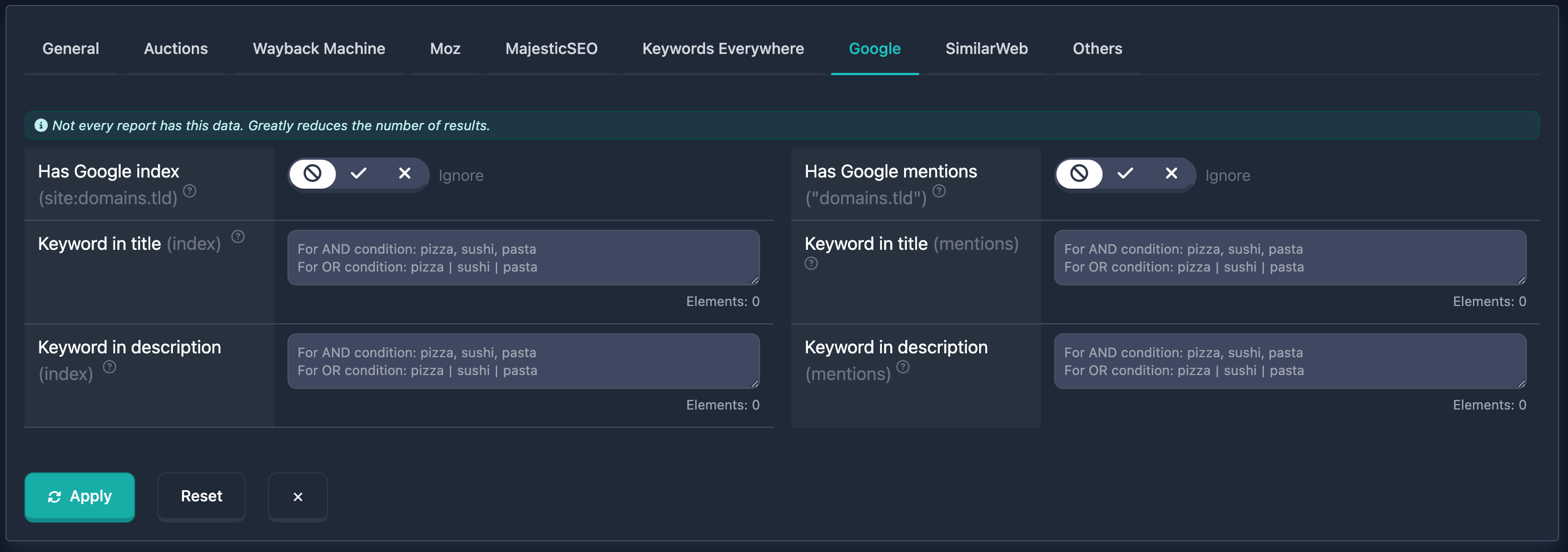
Important: At the top of the Google filters block there is a note: “Not every report has this data. Strongly reduces the number of results.” — keep that in mind.
“Has Google index” filter (site:domain.tld)
Has Google index — at least one Google result for site:domain.tld, i.e. the domain is indexed. The UI uses a three-state toggle.
How to use
- Find Has Google index (site:domains.tld) in the Google filters block.
- Choose a state:
- Yes — only domains with pages in Google’s index.
- No — only domains with no results for
site:domain.tld. - Not set (forbidden icon) — condition is off.
Notes
- Useful to exclude non-indexed domains or to require indexed ones.
“Has Google mentions” filter (“domain.tld”)
Has Google mentions — at least one result for the quoted query "domain.tld" (mentions of the domain as a phrase). Three-state toggle.
How to use
- Find Has Google mentions ("domains.tld") in the Google block.
- Choose Yes, No, or Not set.
Notes
- Different from “Has Google index”: this checks mentions in text, not whether the site itself is indexed.
“Keyword in title (index)” filter
Keyword in title (index) — keywords in the title of the Google snippet for site:domain.tld. Text area for words or phrases.
How to use
- Find Keyword in title (index) in the Google block.
- Enter keywords or phrases:
- AND (all must appear): comma-separated, e.g.
pizza, sushi, pasta. - OR (any one): pipe
|, e.g.pizza|sushi|pasta.
- AND (all must appear): comma-separated, e.g.
- Elements: counter at the bottom right. Max 20; over the limit shows an error.
Notes
- Search runs on the snippet title for
site:domain.tld. - AND and OR can be combined in one field.
Examples
Example 1: Title must include both “coffee” and “delivery” — enter coffee, delivery.
Example 2: Any of the words — enter coffee|delivery|cafe.
“Keyword in title (mentions)” filter
Keyword in title (mentions) — keywords in the snippet title for "domain.tld". Same input rules as “Keyword in title (index)”: comma for AND, pipe for OR, up to 20 elements.
How to use
- Find Keyword in title (mentions).
- Enter words or phrases with comma (AND) or
|(OR). - Watch the element counter — max 20.
Notes
- Data comes from
"domain.tld"results, notsite:domain.tld.
“Keyword in description (index)” filter
Keyword in description (index) — keywords in the snippet description for site:domain.tld. Same format: comma (AND), | (OR), up to 20 elements.
How to use
- Find Keyword in description (index).
- Enter keywords or phrases.
- Check the counter.
Examples
Example 1: Description must include “online store” and “clothing” — enter online store, clothing.
“Keyword in description (mentions)” filter
Keyword in description (mentions) — keywords in the snippet description for "domain.tld". Same format and limit.
How to use
- Find Keyword in description (mentions).
- Enter words or phrases in the required format.
Combining Google filters
Google filters combine with other filters. Multiple conditions use AND — the domain must match all of them. You can save useful combinations.
Example
Goal: Domain is in Google’s index, and the snippet title for site:domain.tld contains “store” and “furniture”.
In the UI: set Has Google index to Yes; in Keyword in title (index) enter store, furniture.
Common issues and fixes
No results after applying filters
Why: Conditions are too strict, or not every report has Google data (see the note at the top).
What to do: Relax or remove some conditions. Avoid overly tight AND logic or too many keyword elements.
“Maximum 20 elements allowed”
Why: More than 20 elements in a keyword field (title or description, index or mentions). Elements are split by comma, pipe, or newline.
What to do: Reduce to 20 or fewer. Use other saved filters for alternate combinations.
Few results because of data
Why: Google data (index, mentions, snippets) is not available for every domain.
What to do: Heed the warning at the top of the block. For other metrics, use the remaining filters.
Tips
-
Index vs mentions: “Index” uses
site:domain.tld(pages in the index); “mentions” uses"domain.tld"(mentions on the web). Pick what fits your task. -
Keywords: Comma = AND,
|= OR. The element counter helps stay within 20. -
Has index / Has mentions toggles: “Not set” disables that condition — handy when experimenting.
-
Data availability: The block warns that not every report has Google data, which reduces results.