- How Moz filters work
- Domain Authority (DA) filter
- Spam Score (SS) filter
- Backlinks filter
- Referring Domains filter
- Backlink URL filter
- Backlink Anchor filter
- Combining Moz filters
- Troubleshooting
- Tips
How Moz filters work
Moz filters let you search domains using metrics from Moz: Domain Authority (DA), Spam Score (SS), backlink count and referring domains, plus backlink URLs and anchor text.
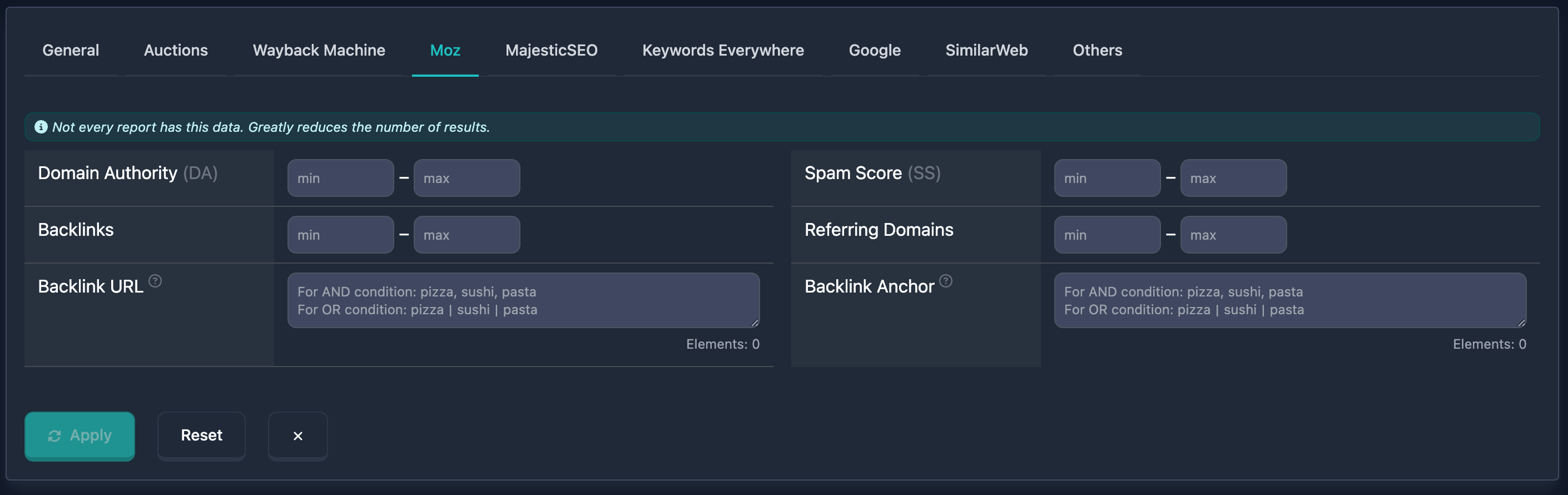
Important: At the top of the Moz block you’ll see: “Not every report has this data. Greatly reduces the number of results.” — keep that in mind when using these filters.
Domain Authority (DA) filter
Domain Authority (DA) is a Moz metric: domain authority on a 0–100 scale. In the UI you set min and max.
How to use
- Find Domain Authority (DA) in the Moz filters block
- Enter the minimum (0–100) in min and the maximum in max (dash between fields)
- You can fill min only, max only, or both for a range
Notes
- High DA (70+) usually means very authoritative domains; mid (30–50) moderate authority; low (0–20) new or weak domains.
Examples
Example 1: High authority (50–100) — min: 50, max: 100.
Example 2: Very high (from 70) — min: 70, leave max empty.
Example 3: Low authority (0–20) — min: 0, max: 20.
Spam Score (SS) filter
Spam Score (SS) is a Moz metric: likelihood of spam or penalties. Values 0–100; higher means higher risk. In the UI: min and max.
How to use
- Find Spam Score (SS) in the Moz block
- Enter min and max (0–100)
- min only, max only, or both
Notes
- Low SS (0–10) is typical for quality domains; mid (10–30) may indicate issues; high (30+) spam risk. For quality, prefer low SS.
Examples
Example 1: Low spam risk (0–10) — min: 0, max: 10.
Example 2: Minimal risk (0–5) — min: 0, max: 5.
Example 3: Acceptable SS (0–20) — min: 0, max: 20.
Backlinks filter
The Backlinks filter selects domains by external backlink count from Moz. min and max in the UI.
How to use
- Find Backlinks in the Moz block
- Enter min and max (0 upward)
- min only, max only, or both
Notes
- A large backlink count often reflects popularity and authority. Quality beats quantity.
Examples
Example 1: Many backlinks (from 1000) — min: 1000, leave max empty.
Example 2: Moderate (100–1000) — min: 100, max: 1000.
Referring Domains filter
Referring Domains selects domains by how many unique referring domains Moz reports. min and max in the UI.
How to use
- Find Referring Domains in the Moz block
- Enter min and max (0 upward)
- min only, max only, or both
Notes
- Many referring domains often means a more natural, diverse link profile.
Examples
Example 1: Many referring domains (from 100) — min: 100, leave max empty.
Example 2: Moderate (10–50) — min: 10, max: 50.
Backlink URL filter
Backlink URL searches domains by the URLs of pages that link to them. One text field with a hint on logic and an Elements counter (max 20); the field label has a tooltip icon.
This is how you can find domains that get links from Wikipedia — just enter
wikipedia.orgin this field.
How to use
- Find Backlink URL in the Moz block
- Enter URLs or URL fragments in the text field
- Separators: comma — AND (all URLs must appear), pipe
|— OR (any one is enough) - Bottom right: Elements counter (max 20). If exceeded — Maximum … elements allowed
Placeholder: “For AND: pizza, sushi, pasta. For OR: pizza|sushi|pasta”.
Examples
Example 1: Links from any of several domains (OR) — example.com | test.com | sample.org.
Example 2: Links from both paths (AND) — example.com/blog, example.com/news.
Example 3: Links from one domain — example.com.
Backlink Anchor filter
Backlink Anchor searches domains by anchor text of backlinks. Text field with hint and Elements counter (max 20); label has a tooltip (“Search only in TOP 3 results”).
How to use
- Find Backlink Anchor in the Moz block
- Enter anchor text or keywords; separators: comma — AND,
|— OR - Watch the Elements counter; over 20 — Maximum … elements allowed
Examples
Example 1: Any of several anchors (OR) — click here | read more | learn more.
Example 2: All terms in anchor (AND) — buy, discount, sale.
Example 3: Brand anchors — company name | brand name.
Combining Moz filters
You can combine Moz filters with others for tighter search. With multiple filters, logic is AND — the domain must match all conditions. You can save useful combinations.
Example
Goal: High DA (from 50), low Spam Score (0–10), many referring domains (from 50), links from example.com.
In the UI: Domain Authority (DA) min 50, max 100; Spam Score (SS) min 0, max 10; Referring Domains min 50; in Backlink URL enter example.com. Results only include domains matching all of these.
Troubleshooting
“Maximum … elements allowed”
Cause: More than 20 elements in Backlink URL or Backlink Anchor. Elements counter and red warning when over the limit.
Fix: Remove entries until the counter is ≤ 20.
No results
Cause: Conditions too strict, or Moz data missing for many domains (see the block hint).
Fix: Relax or disable filters step by step to see when results appear. Use other filters if needed.
Few results because of Moz coverage
Cause: Not every domain has Moz data — filters only apply where data exists.
Fix: Remember the note at the top (“Not every report has this data…”). For other domains, rely on the rest of the search filters.
Tips
-
DA + Spam Score: High Domain Authority and low Spam Score help find quality domains.
-
Referring Domains: A high count often means a more natural link profile.
-
Backlink URL and Backlink Anchor: Useful for domains getting links from specific sources or with specific anchors. Note the TOP 3 hint.
-
Text field logic: Comma = all elements required (AND); pipe
|= any (OR). Watch Elements (max 20). -
Data availability: The block warns that not every report has Moz data — that reduces result counts.