- How other filters work
- Open PageRank filter
- Brand Score filter
- Trustpilot filters
- Combining other filters
- Troubleshooting
- Tips
How other filters work
Other filters let you search domains using metrics and data from third-party services: Open PageRank, Karma Brand Score, and Trustpilot data (rating, review count, category).
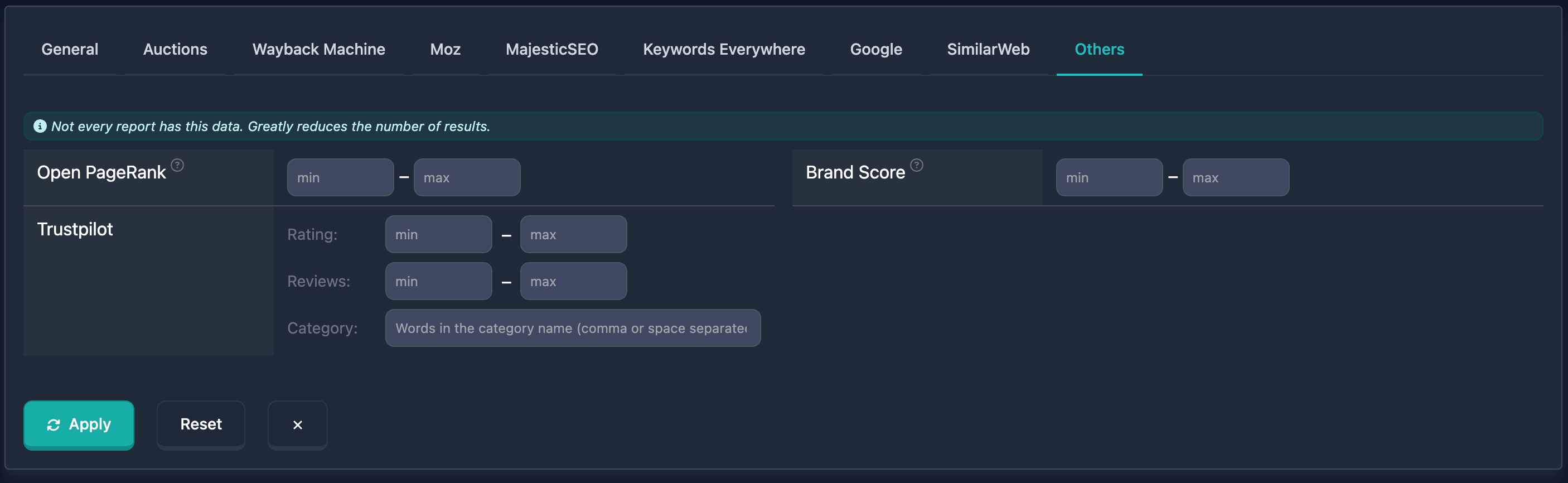
Important: At the top of the other-filters block you’ll see: “Not every report has this data. Greatly reduces the number of results.” — keep that in mind.
Open PageRank filter
Open PageRank is an open metric based on the classic PageRank algorithm: domain authority from backlinks. In the UI: min and max (0–10). The field label links to a description of the metric.
How to use
- Find the Open PageRank block in other filters
- Enter min and max (0–10)
- min only, max only, or both
Notes
- High Open PageRank (7+) usually indicates very authoritative domains; mid (3–6) moderate authority; low (0–2) new or weak domains.
Examples
Example 1: High authority (7–10) — min: 7, max: 10.
Example 2: Very high (from 8) — min: 8, leave max empty.
Example 3: Moderate (3–6) — min: 3, max: 6.
Brand Score filter
Karma Brand Score measures how “brandable” the domain name is: pronounceability, memorability, uniqueness, and appeal (the algorithm draws on radio tests, cognitive psychology, and phonetics). Values 0–100. In the UI: min and max; the label has a tooltip with more detail.
How to use
- Find the Brand Score block in other filters
- Enter min and max (0–100)
- min only, max only, or both
Notes
- High Brand Score (80+) — strong brandable domain; 65–80 — solid practical choice; below 65 — noticeable limitations. See the Karma Brand Score article for more.
Examples
Example 1: Strong brandable domain (80–100) — min: 80, max: 100.
Example 2: Solid practical choice (65–80) — min: 65, max: 80.
Trustpilot filters
Trustpilot filters search domains using Trustpilot data: rating, number of reviews, and category.
Trustpilot is a customer review platform that helps assess reputation and trust for a domain.
General principles
You can combine Trustpilot filters with others for tighter search. With multiple filters active, logic is AND — the domain must match all conditions at once.
Trustpilot rating filter
In the Trustpilot block, Rating: with min / max (0–5, step 0.1). Trustpilot ratings run from 0 to 5; higher is better reputation.
How to use
- Find the Trustpilot block in other filters
- Under Rating: enter min and/or max (decimals allowed, e.g. 4.5)
- min only, max only, or both
Examples
Example 1: High rating (4.0–5.0) — Rating min 4.0, max 5.0.
Example 2: Very high (from 4.5) — min: 4.5, leave max empty.
Trustpilot reviews filter
In the Trustpilot block, Reviews: with min / max for review count (0 upward).
How to use
- In Trustpilot, find Reviews:
- Enter min and/or max
- min only, max only, or both
Examples
Example 1: Many reviews (from 100) — min: 100, leave max empty.
Example 2: Moderate (10–100) — min: 10, max: 100.
Trustpilot category filter
In the Trustpilot block, Category: is a text field (with placeholder). Search matches domains whose Trustpilot category matches any of your entries (OR); you can enter part of a name.
How to use
- In Trustpilot, find Category:
- Enter a category name or fragment (several — comma or space separated)
- Case does not matter
Examples
Example 1: Category containing “Technology” — enter Technology in Category.
Example 2: “Retail” or “E-commerce” — enter Retail, E-commerce or Retail E-commerce.
Example 3: Any category containing “Shop” — enter Shop.
Combining other filters
You can combine these filters with others for tighter search. With multiple filters, logic is AND. You can save useful combinations.
Example
Goal: High Open PageRank (from 7), high Brand Score (from 80), Trustpilot rating from 4.0, at least 50 reviews.
In the UI: Open PageRank min 7, max 10; Brand Score min 80, max 100; in Trustpilot — Rating min 4.0, max 5.0 and Reviews min 50. Results only include domains matching all of this.
Troubleshooting
No results after applying filters
Cause: Conditions too strict, or not all domains have data for these metrics (see the block hint).
Fix: Relax or turn off filters step by step to see when results appear. Use other filters if needed.
Few results because of data coverage
Cause: Not every domain has Open PageRank, Brand Score, or Trustpilot data.
Fix: Remember the note at the top (“Not every report has this data…”). For other domains, rely on the rest of the search filters.
Tips
-
Open PageRank and Brand Score: High values help find authoritative domains and highly brandable names.
-
Trustpilot: Combining Rating and Reviews is useful for reputation.
-
Category: Good for niche search — partial names, several categories separated by comma or space.
-
Trustpilot rating: You can enter decimal values (e.g. 4.5).
-
Data availability: The block warns that not every report has this data — that reduces result counts.