- Where to find preset filters
- General preset filters
- Auction preset filters
- How to use a preset
- Presets vs “My filters” and AI search
- Summary
Preset filters are ready-made filter combinations you can apply in one click from the AI search field. They appear in the dropdown under the heading “📌 Preset Filters” (or the localized equivalent). Choosing a preset fills the filter panel with the right conditions; you can then run search or tweak parameters.
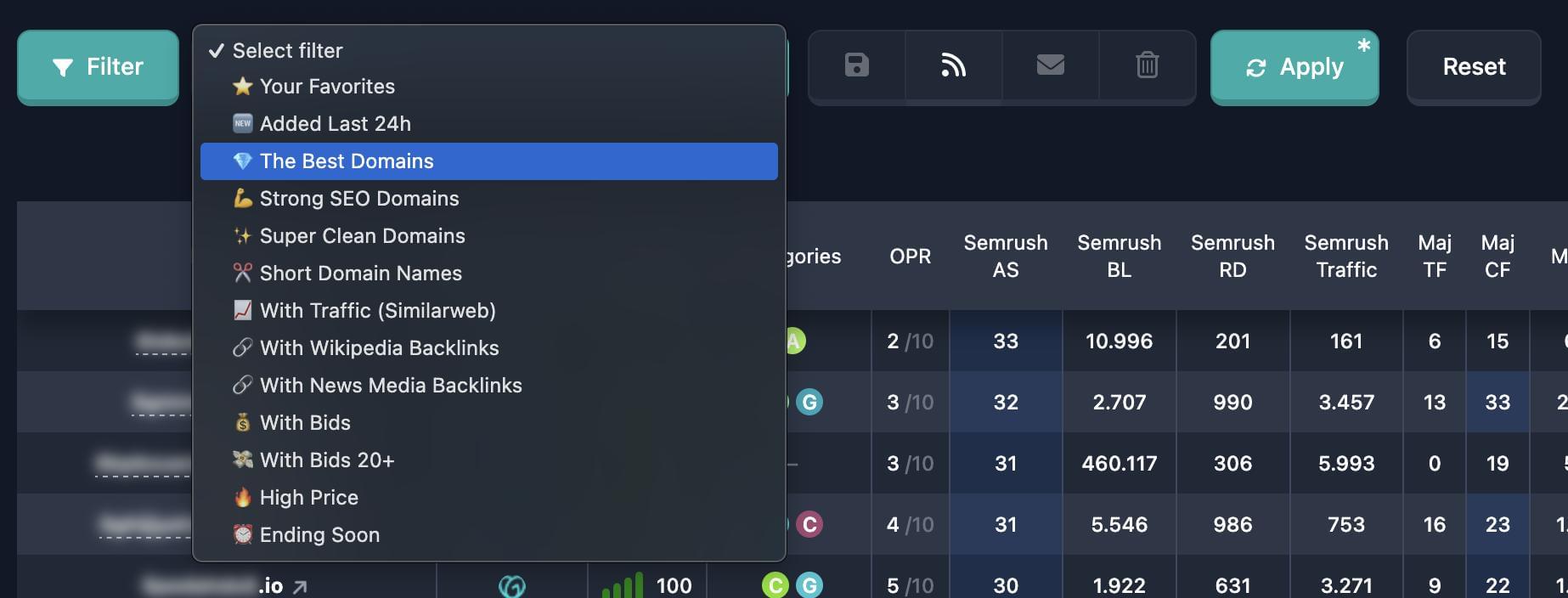
On Auctions and Backorder databases you get both general presets and auction-specific ones (bids, price, end time, closeouts). On other databases only the general presets are shown.
Where to find preset filters
- Open the filter panel on the domain search page (Expired, Auctions, Backorder, etc.).
- Find the input with the gradient border at the top (AI search field).
- Click the field — a dropdown opens.
- At the top of the list you’ll see “📌 Preset Filters”. Each row is one preset; clicking it selects it and applies it to search.
- Below you may see “💾 My filters” — combinations you saved. Presets are visually separate from those.
General preset filters
These presets are available on all database types (Expired, Auctions, Backorder, etc.).
⭐️ Your Favorites — only domains in your favorites. Requires sign-in.
🆕 Added Last 24 hours — reports added to the system in the last 24 hours.
🆕 Added Last 7 days — reports added in the last 7 days.
💎 The Best Domains — high-quality domains: Karma Score at least 70, Karma Metric at least 20, at least 3 years of history in the archive.
💪 Strong SEO Domains — domains with meaningful link profiles: minimum thresholds for Trust Flow, Citation Flow, Majestic backlinks and referring domains, plus Moz backlinks, referring domains, and Domain Authority (thresholds are set to filter out SEO-empty domains).
✨ Super Clean Domains — “clean” domains: Karma Score at least 70, no ideographs in archived content, no redirects, and no 403 error pages in snapshot history (conditions use Wayback Machine filters).
✂️ Short Domain Names — short SLDs: maximum name length (without the TLD) is 5 characters.
📈 With Traffic (Similarweb) — domains with estimated traffic in Similarweb: at least 1 visit (i.e. the domain appears in Similarweb as having traffic).
🔗 With Wikipedia Backlinks — domains that get links from Wikipedia (“wikipedia” appears in the backlink URL).
🔗 With News Media Backlinks — domains linked from news and media sites in the list (BBC, CNN, NY Times, Reuters, The Guardian, Financial Times, Al Jazeera, AP News, USA Today, LA Times, WSJ, Washington Post, CBS News, Fox News, Euronews, The Economist, Forbes, and others).
🔗 .edu/.gov Backlinks — domains that get links from sites in .edu or .gov zones.
🔮 Brandable Domains — domains with high Karma Brand Score: at least 70 (strong on pronounceability, memorability, uniqueness, and appeal).
⚰️ Aged Domains — aged domains: at least 10 years of history in the Wayback Machine archive.
Auction preset filters
On Auctions and Backorder, auction presets are added to the general list. They only make sense for reports that include auction data.
💵 With Bids — listings with at least one bid (minimum 1 bid).
💰 With Bids 20+ — listings with strong interest: at least 20 bids.
🔥 High Price — listings whose current price is at least 1000 USD.
⏰ Ending Soon — auctions ending within the next 24 hours.
💸 Closeouts — “closeout” listings on Dynadot and GoDaddy (domains sold at reduced prices).
How to use a preset
- Open the AI search dropdown (click the field).
- In “📌 Preset Filters”, click the preset you want (e.g. “💎 The Best Domains”).
- The list closes and the field shows the selected preset name. Its parameters are applied to the filter panel automatically.
- If needed, open the filter panel and adjust individual settings — a preset only sets the starting conditions; you can extend or relax them.
You can switch to another preset, use AI search (type your own query), or open saved filters if you have any.
Presets vs “My filters” and AI search
- Preset filters — a fixed list from the service; one click applies a defined combination. You can’t edit the preset itself, but you can change values in the filter panel after choosing it.
- My filters — your saved combinations (name + parameters). You can save, overwrite, and delete them.
- AI search — you describe what you want in natural language and AI maps it to filter fields. You can pick presets without typing text.
Summary
- Preset filters open from the AI search dropdown under “📌 Preset Filters”; choosing one fills the filter panel.
- General presets (all databases): favorites, added in 24h / 7d, best domains, strong SEO, super clean, short names, Similarweb traffic, Wikipedia / news / .edu|.gov backlinks, brandable, aged.
- Auctions and Backorder add: with bids (1+ and 20+), high price, ending within 24h, Dynadot/GoDaddy closeouts.
- After selecting, run search or apply filters; you can still edit parameters manually.