
42 MCP tools in Karma.Domains let you run a domain search from Claude or Cursor against 49 lists from 32 platforms, all in one place. You connect the MCP server and describe the brief in plain English. The assistant turns that into filters, returns matching domains with report links, and can run live checks such as domain availability, WHOIS, anchor text and archive age. Start with one search, tighten it, read the top reports, and recheck availability right before you decide. Below are the prompts I use, the order I run them in, and one real run from a plain-English brief to two names worth a closer look. The AI agent does the first-pass search; report reads and live checks are where I verify a shortlist before acting.
Table of Contents
- Table of Contents
- Quick answer
- What the 42 MCP tools cover
- Prompts for agency work
- How to connect
- The six-step workflow I use
- Prompts for searching
- Prompts for checking one domain
- Where prompts go wrong
- Claude or Cursor: which one I use for what
- FAQ
- What to do next
Quick answer
42 MCP tools in Karma.Domains let you search and check domains from Claude or Cursor against 49 lists from 32 platforms, all in one place. You connect the MCP server, describe the brief in plain English, and the assistant turns that into filters. It returns matching domains with report links and can run live checks such as availability, WHOIS, anchor text and archive age. Start with one search, tighten it, read the top reports, and recheck availability right before you decide.
- Search the database of 13M+ domains across 49 lists from 32 platforms
- Read full reports for the shortlist
- Check a name live: availability, WHOIS, anchor text, archive age
- Save the search, tag names and make a share link
What the 42 MCP tools cover
The Karma.Domains MCP server gives Claude or Cursor 42 MCP tools on top of a database of 13M+ domains across 49 lists from 32 platforms, with 400k+ new domains added daily. I think of those tools as four jobs. Requests get much more predictable once you know which job you're asking for.
| Job | What you ask | Tools the assistant calls |
|---|---|---|
| Search the database | "Find expired .com domains about…" | search_reports, instructions |
| Read stored reports | "Show me the full report for the top three" | get_report, get_domain |
| Check a name live | "Is it still available? Who registered it?" | check_domain_expiry, whois_lookup, domain_expiry_checker, anchor_text_checker, domain_age_checker, spam_score_checker, dns_lookup |
| Keep the work | "Save this search, tag these two, make a share link" | save_saved_filter, set_report_annotation, create_share_link, add_favorite |
Search runs on the same 90+ filters as the web app: domain type, keywords, content language, archive age, categories to include or exclude, spam score, referring domains, TLDs, redirects, Karma Metric and more. The assistant chooses the fields. You can see them in the tool call and correct them.
Live checks work differently. A domain availability check looks at one domain name at the moment you ask, so it catches what a stored report can't, like a name someone else registered an hour ago. DNS and WHOIS lookups add current technical and registration details.
Prompts for agency work
The same 42 tools work when you're handling more than one client or niche.
For a batch of client niches, I paste the list and ask:
For each of these client niches, search Karma.Domains for expired
.comdomains, English content, at least 5 years of archive history. Then tighten the search: exclude No Content and risky categories, Moz spam score 10 or lower, at least 10 referring domains. Give me five names per niche with report links.
For a daily shortlist under one account, I save the search once (a saved filter can also arrive as an email digest) and, in Claude or Cursor, ask:
Search Karma.Domains with the same filters as "[client] clean .com" and show me domains added in the last 24 hours. For the top five, read the reports, flag anything whose AI summary or anchors look like spam, gambling or pharma, and check domain availability on the ones that survive.
When someone sends a name they want to buy for a client, I skip search and go straight to checks:
Look up [domain] in Karma.Domains and summarize the report: archive history, AI summary, categories, Moz and Majestic numbers. Then check whether it's available to register right now, pull the anchor text, and tell me if the archive has long gaps.
How to connect
There are two ways to connect, and both require the Pro plan. In Claude.ai and other OAuth clients you add the server as a custom connector and sign in to your Karma.Domains account in the browser, with no API key to paste (Anthropic's guide). In Cursor and similar IDE clients you add the server URL in MCP settings and authenticate with a Pro API key from Profile → Developer (Cursor docs). Setup steps for each client are on the Karma.Domains MCP page, so this article starts after you're connected. MCP (Model Context Protocol) is the open standard behind the connection; the spec is at modelcontextprotocol.io.
The six-step workflow I use
I run domain research in six short steps: write a brief, run a loose search, tighten the filters, read the top reports, run live checks, then save the work. Each step is one short instruction, and I read the tool call before I read the answer.
- Write the brief: topic, language, minimum history, TLDs.
- Run a loose search to see how big the pool is.
- Tighten it with category exclusions, a spam cap and a link floor.
- Read the full reports for the top few names.
- Run live checks on whatever survives.
- Save the search and annotate the names you keep.
I did the run below for this article through the Karma.Domains MCP server, with an assistant making the tool calls. The same prompts work in Claude and in Cursor.
Steps 1 and 2: the brief and a loose search
My first prompt:
Search Karma.Domains for expired domains about woodworking or carpentry. English content, at least 5 years of archive history. Sort by Karma Score.
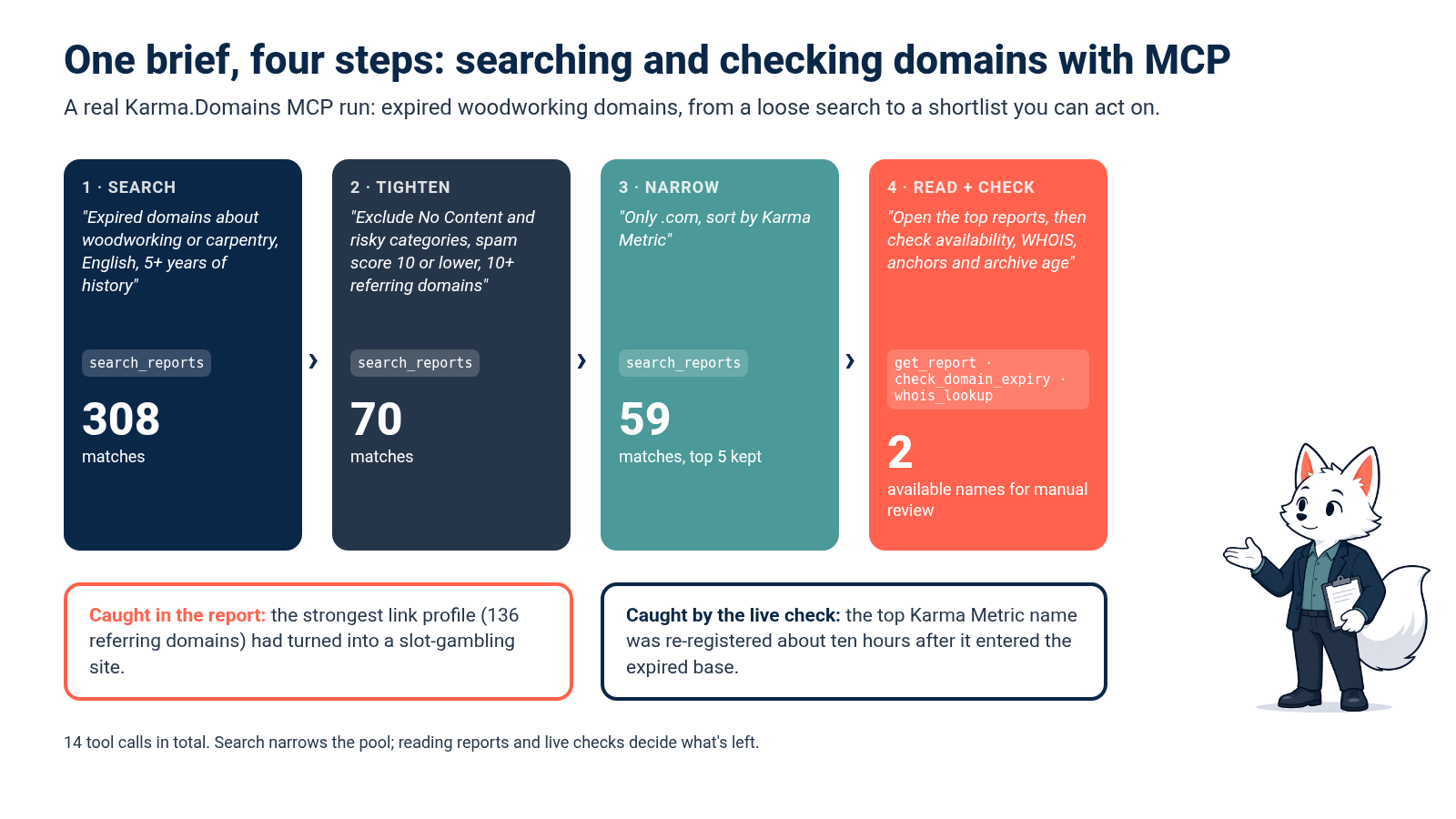
The assistant called search_reports with domain_type expired, keywords "woodworking | carpentry", an English content ratio of at least 70% and wa_age_min 5. That returned 308 matches. The top ten were mostly small local businesses: handymen, remodelers and carpenters in Connecticut, Michigan, Dublin and Hampshire. A search this loose tells you the size of the pool and not much else.
Step 3: tighten the search
Second prompt:
Same search, but exclude No Content and all risky categories (gambling, adult, pseudo-health, high-risk investments, scams, illegal, hate, astrology, cannabis). Moz spam score 10 or lower, at least 10 referring domains.
The assistant added categories_exclude, a Moz spam score cap of 10 and a referring-domain floor of 10, and the pool dropped from 308 to 70. Third prompt:
Only
.com. Sort by Karma Metric, highest first.
With tlds set to com and sort_by karmametric, 59 names were left. The top five were yourworkshopjournal.com (Karma Metric 22), aka-woodland.com (19), gemcraftcontracting.com (19), arnoldpaintingservice.com (17) and barwonvalleywoodwrights.com (16).
The referring-domain floor in that request doesn't name a vendor, so a domain passes when any of the link sources clears it. One carpentry site in the tightened list had 0 referring domains in Moz and still got through on another vendor's count. If one source matters to you, name it when you ask: "at least 10 referring domains in Majestic."
Step 4: read the reports
Fourth prompt:
Open the full reports for the top five. For each one, summarize the archive history, the anchor profile and anything that looks like spam. Don't skip the AI summary.
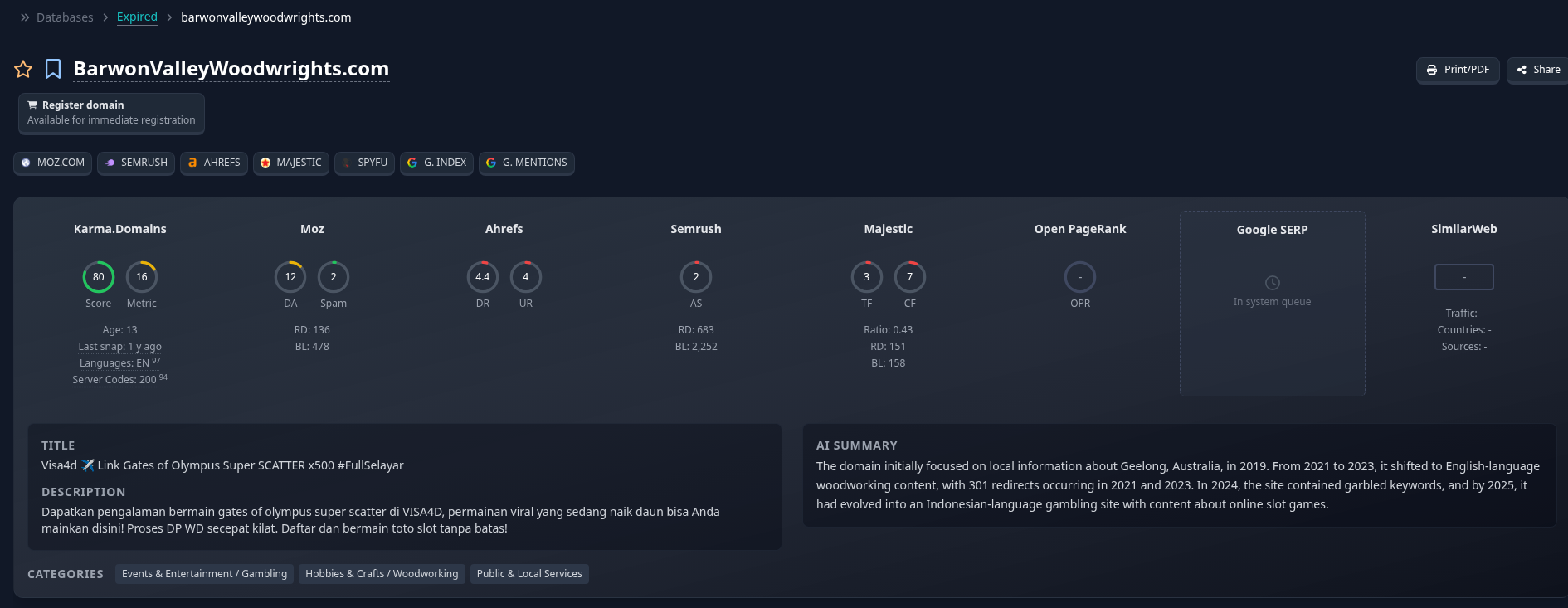
This step knocked out the name with the best link numbers. barwonvalleywoodwrights.com had 136 referring domains in Moz, 151 in Majestic and 13 years of archive history. Its AI summary described a local Geelong information site that became a woodworking site and later an Indonesian-language slot-gambling site. The last captured page title promoted "Gates of Olympus" with a "Super SCATTER x500" offer, and 57% of the anchors in the Moz sample were "visa4d".
It got past my gambling exclusion because its category labels included an older "Events & Entertainment / Gambling" path, which isn't the "Gambling & betting" category my prompt excluded. The filter did exactly what it was told. Reading the report caught the rest, which is why I keep step 4 as its own step.
Step 5: live checks before you get attached
Fifth prompt:
For yourworkshopjournal.com and aka-woodland.com, check whether each is available to register right now. If not, run a WHOIS lookup and tell me the registrar and when it was registered. Then pull anchor text and archive age for anything that's available.
The two names went opposite ways.
yourworkshopjournal.com came back available: false. The lookup showed a new registration at Namecheap on Cloudflare nameservers, created about ten hours after the domain entered the Karma.Domains expired base. Its stored report still said expired, because a report shows the state at the time it was built. The top name on my list was already gone.
aka-woodland.com came back available: true. The archive check found 71 captures across eight years, with a stretch of 502 errors in the middle. Every anchor in the sample was the brand or the URL (aka-woodland.com, https://aka-woodland.com/). Moz counted 1,657 backlinks from just 24 referring domains, which looks like sitewide links, so I'd want a person to read through that link profile before buying.
I added frostbitefurniture.com from further down the list. It was a Minnesota furniture refinishing and repair business with Majestic Trust Flow 16, 38 referring domains and archive history covering most of a decade, and it was also available: true.
At the end of the run I had two available names for manual review. The best-looking link profile turned out to be a slot site, and the top Karma Metric name had already been registered by someone faster. The assistant made 14 tool calls in total: three searches, four report reads, three availability checks, two anchor checks, one archive check and one WHOIS lookup.
Step 6: keep the work
I didn't save anything on this test run, because saved filters, notes and tags change your account. When I do want to keep a search, this is the prompt:
Save this search as "woodworking .com clean". Tag aka-woodland.com and frostbitefurniture.com as "review" with a one-line note on why.
A saved filter can also arrive as an email digest (how filter emails work), so a one-off search becomes a daily list. Notes and tags need the Pro plan, which you already have if MCP is connected.
Prompts for searching
These are the search prompts I reuse. Each one maps cleanly to filters, which is why they behave.
- "Expired
.comor.netdomains about [topic], English content, at least 3 years of history, no redirects, exclude No Content and risky categories." This is my default for a niche with a clean history. - "Expired domains added in the last 24 hours with Karma Metric 20 or higher." Fresh rows can be missing metrics, since data fills in over the first hours, so rerun later if a field is empty.
- "At least 20 referring domains in Majestic, Trust Flow 10 or higher, Moz spam score 5 or lower." Naming the vendor keeps the link floor honest.
- "Auction domains about [topic] with bids, sorted by number of bids." Add the auction source if you only buy on one platform.
- "No Asian-script content, no adult, no gambling, no pharma." The assistant maps plain-word exclusions like these to the content and category filters.
Prompts for checking one domain
When someone sends me a single name and asks whether it's any good, I skip search and go straight to checks:
- "Look up [domain] in Karma.Domains and summarize the report: archive history, AI summary, categories, Moz and Majestic numbers."
- "Is [domain] available to register right now? If not, who's the registrar and when does it expire?"
- "Pull the anchor text for [domain] and tell me if any anchors look like spam, adult, gambling or pharma."
- "How old is [domain] in the Wayback Machine, and are there long gaps?"
Each of these checks also has its own page if you'd rather run it by hand: WHOIS lookup, domain expiry checker, anchor text checker and domain age checker. For reading old snapshots yourself, I wrote up the process in how to look up a domain's history.
Where prompts go wrong
Most prompt failures come from vague criteria, trusting an exclude list, treating a stored report as live status, asking for too many live checks at once, or skipping the tool call.
Vague adjectives
"Good backlinks" and "clean history" leave the assistant guessing. Numbers don't: at least 10 referring domains, spam score 5 or lower, 3+ years of history.
Trusting the exclude list
A category filter catches what it's labeled for, as barwonvalleywoodwrights.com showed. Ask the assistant to read the AI summary and anchors of every finalist and flag gambling, pharma or adult wording.
Treating a stored report as live status
yourworkshopjournal.com still showed as expired in its report after someone had registered it. Run check_domain_expiry right before you act.
Asking for everything at once
"Find, check and rank 50 domains" mixes search and live checks and is hard to review. My rule is to search wide and check narrow: live checks on five names, never fifty. For a long client list, run the checks in small batches and read the results before the next batch.
Skipping the tool call
To verify, inspect the filter arguments Claude or Cursor sends. A wrong filter gives a wrong result, and the arguments are where you'll spot it.
Claude or Cursor: which one I use for what
Use Claude for open research that ends in a shortlist and reasons, and Cursor when the output belongs in a file: a CSV of names in a repo, a script that reads report IDs, or notes next to code. Both MCP clients use the same tools to search for domain names and run checks. In Cursor I'll ask for "a markdown table of the shortlist with domain, report link, Karma Metric and a one-line verdict, saved to shortlist.md."
In both, the assistant handles collection and first-pass screening. Whether a name fits your project, and what it's worth to you, is still your call.
FAQ
Can Claude search for domains?
Yes. With the Karma.Domains MCP server connected, Claude can search expired, auction, backorder and buy-now domains, read full reports and run live checks such as availability and WHOIS. You describe the search in plain English and Claude builds the filters.
Do I need an API key to use the Karma.Domains MCP server?
It depends on the client. Claude.ai and other OAuth clients can sign in to your Karma.Domains account in the browser, with no key to paste. Cursor and similar IDE clients use a Pro API key in the Authorization header. In both cases the MCP server requires the Pro plan.
How many tools does the Karma.Domains MCP server have?
42 MCP tools. They cover database search, report reads, live domain checks, saved filters, notes, tags, favorites and share links.
Is a domain in search results available to register?
Not always. A stored report reflects the moment it was built, and good names get re-registered quickly. Before buying, check domain availability with the live check_domain_expiry tool; a stored report is not a real-time availability result.
Can I use the same prompts in Cursor and Claude?
Yes. Both clients call the same MCP tools with the same filters. Claude suits conversational research, and Cursor suits work where results go into files.
What to do next
Pick a niche you know well, or one client account, and run the six steps on it: a loose search, a tighter one, report reads, live checks, then a saved filter. Compare the shortlist with what you'd have picked by hand. If you haven't connected yet, the Karma.Domains MCP page has setup steps for each client.