
A parked domain is a registered domain that isn't connected to a website or email. Instead, its URL opens a stand-in page: the domain registrar's default page, a "coming soon" notice, pay-per-click ads, or a "domain for sale" message. Owners keep these names for future use, brand protection, ad revenue or resale.
Whether you land on a parked page or want the name for SEO, here's how to check one and buy it.
Table of Contents
- Table of Contents
- Key takeaways
- What is a parked domain?
- What does it mean when a domain is parked?
- Common types of parked domains and what they look like
- Why park a domain? Brand protection, monetization and more
- How domain parking works: DNS and domain management
- How to tell if a domain is parked
- Parked domain vs expired domain vs addon domain
- How to buy a parked domain (step by step)
- How to list a parked domain for sale
- Is a parked domain worth buying for SEO?
- Is domain parking legal? Security risks to know
- FAQ
- Conclusion
Key takeaways
- The name is taken and paid for, but it has no live site or email behind it.
- You can spot one by its holding page, parking-service nameservers in WHOIS, and years of empty snapshots in the Wayback Machine.
- Many of them can be bought: through a for-sale page, a marketplace listing, the owner, a broker, or a backorder if it drops.
- For SEO, years of parking usually mean little value left. Check the history before you buy.
What is a parked domain?
A parked domain is a domain name that someone has registered and keeps renewing but doesn't use for a website or email. The domain owner points it at a holding page instead of real content. It's an inactive domain, but not a free domain: nobody else can register a domain name that's already taken, and the only way to get it is to buy it from the owner or wait for it to expire.
Parked isn't the same as available. Anyone can register an available domain in a minute. A parked name already has an owner, a domain registrar, and an expiration date.
What does it mean when a domain is parked?
If you see "This domain is parked" or GoDaddy's "Parked Free" page, it means the name is registered, the owner is holding it, and there's no website on it right now. The page you see is whatever the owner, or the company they registered it with, chose to show.
For you as a visitor, it usually means the domain isn't free to register, and there's a decent chance it's for sale.
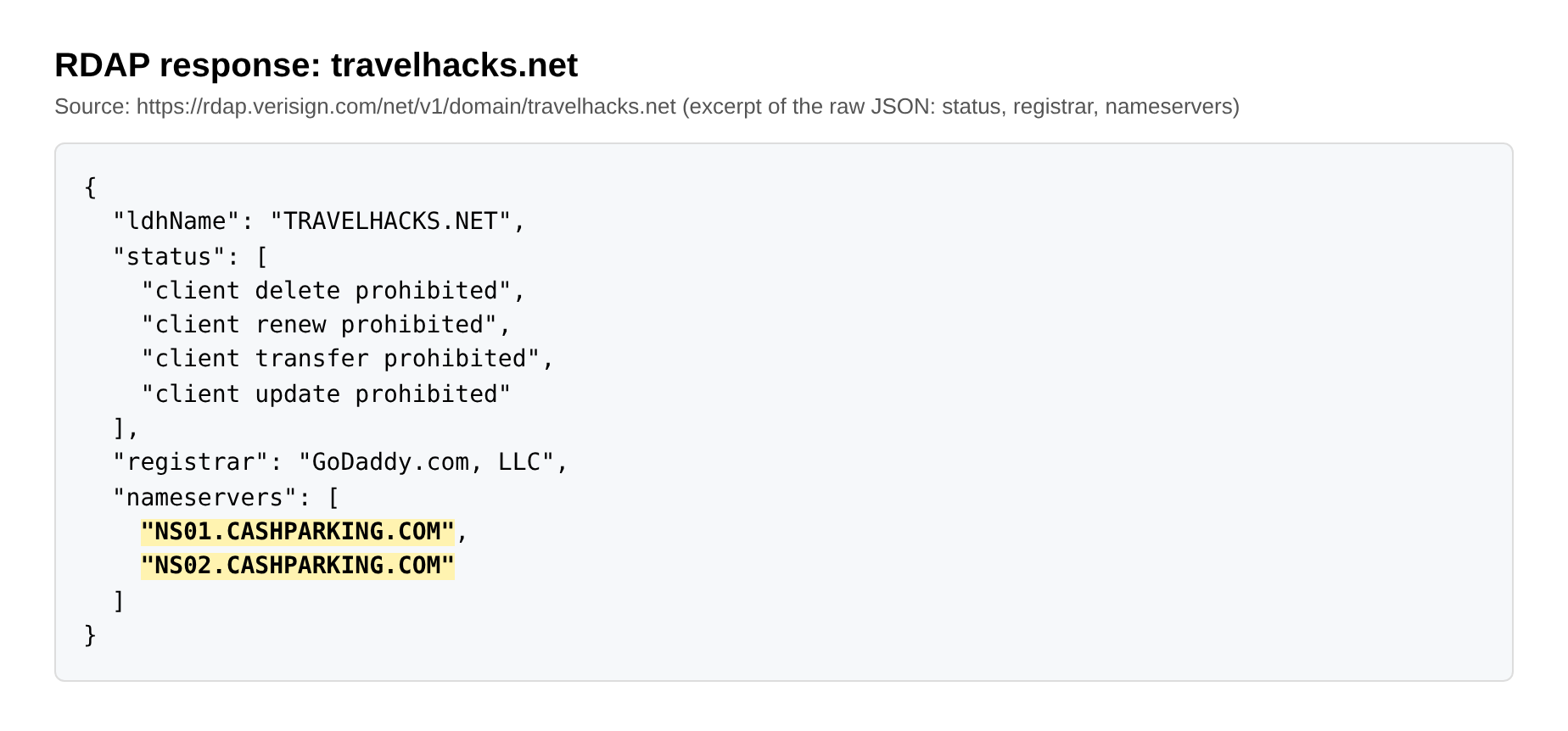
One domain I checked recently is a typical case. Travelhacks.net opens no real site. Its nameservers are ns01 and ns02.cashparking.com, a monetized parking program. The WHOIS record (RDAP, the modern version of WHOIS) shows a registration renewed for years, an expiration date still months away, and the standard "client transfer prohibited" locks. The Wayback Machine has years of snapshots, and not one with real content. Somebody keeps paying for it, and nothing has ever been built on it.
Common types of parked domains and what they look like
It looks like a page with no real content of its own. Almost every example falls into one of four common types of parked domains, and the layout tells you what the owner wants.
Registrar default page
This is what you get when someone registers a domain name and never sets up DNS. The page carries the company's branding and often a search bar for new domains. The owner probably bought the name to use in the future or simply forgot about it.
Pay-per-click (PPC) ad page
A page of sponsored links means the owner has put the domain into a monetized parking program. Visitors click the ads and the owner gets a share of the revenue. This usually points to a domain investor who wants some income while the name waits for a buyer. It's also the type typosquatting relies on.
"This domain is for sale" landing page
A domain marketplace page with a "buy now" price or a "make an offer" form is the clearest signal. The owner wants to sell, and you can often start the purchase on that page.
"Coming soon" page
A simple "coming soon" or "under construction" page usually comes from a business or person who plans to launch a site. These owners are the hardest to buy from, because the name has a job lined up.
Why park a domain? Brand protection, monetization and more
The goal is to hold a name you aren't ready to use. The common reasons:
- Reserving a name for a future project. A startup will reserve a domain name before the product exists.
- Protecting a brand. Companies register multiple domain names (misspellings, other top-level domain extensions, similar names) to cover their trademarks or brand names so nobody else can use them.
- Investing and reselling. Domain investors buy names they expect to sell later at a higher price. This is domain flipping, and such names fill most marketplaces.
- Earning ad revenue. Monetized parking turns type-in traffic into a small income stream.
- Holding a fresh purchase. Many names sit idle for a while right after they're bought at auction or caught when they drop, until the new owner decides what to build.
How domain parking works: DNS and domain management
Domain parking involves pointing a registered but unused domain at a placeholder page instead of a website. It works through DNS: the owner points the domain's nameservers, or its A record, at a server that returns the same page for any address a visitor opens. No hosting provider or site files are needed.
Free parking vs monetization
Free parking is the default wherever you register domain names. Leave a fresh name alone and it points at the seller's own ad or notice page. You pay nothing extra, and the seller keeps any ad revenue.
Monetized parking means the owner switches the nameservers to a domain parking service such as Sedo or the seller's own program. The service fills the page with ads or a sales banner and splits the revenue with the owner.
How much does it cost to park a domain?
Parking a domain usually costs nothing beyond the domain's registration and renewal fees. New names are parked for free, and monetized parking services make their money from a revenue share instead of a fee. So if you buy a name and never set up a site, it's already parked for free. What you pay for is keeping the domain registered every year.
How to tell if a domain is parked
You can tell by checking four things: the page, the nameservers, the WHOIS dates and status, and the archive history.
- The page itself. If it matches one of the types above (default page, ad links, for-sale banner, coming soon), the name is almost certainly parked.
- The nameservers. Run the domain through a WHOIS lookup and look at the name server rows. Names like cashparking.com, sedoparking.com, parkingcrew.net, bodis.com or the seller's own "parking" nameservers give it away.
- Status and expiration date. The same WHOIS report shows when the domain was registered, when it expires, and its status codes. A domain renewed for years with nothing on it is a long-term hold. An expiration date coming up soon can matter if you want to buy it.
- Archive history. Open the domain in the Wayback Machine. Years of identical holding-page snapshots mean long-term parking. A real site in the past followed by ads or a for-sale notice means the domain changed hands or was abandoned.
There's no official parked domain checker. Checker tools automate the same signals, mostly the nameservers and the page content, so a manual look at WHOIS and the archive is just as reliable.
Parked domain vs expired domain vs addon domain
A parked domain is owned and held, an expired domain has lapsed and may soon be released, and an addon domain is a hosting setting. Here's how they compare:
| Type | Status | Who controls it | Can you buy it? | Typical source |
|---|---|---|---|---|
| Parked domain | Registered and renewed, no live site | The current owner | Only from the owner, or after it expires | A default page, an investor portfolio, a brand reserve |
| Expired domain | Registration lapsed, in grace or redemption | The registrar, then the registry | At an expired domain auction, by backorder, or after it drops | Owners who stopped renewing |
| Addon domain (cPanel) | Registered, serving its own site from a shared hosting account | The hosting account owner | Not a sale category; it's a hosting setup | Web hosts like cPanel |
| Redirect | Registered, forwards visitors to another domain | The owner | Only from the owner | Rebrands, merged sites, typo protection |
Expired domains are the ones SEOs usually hunt, because some of them still carry a real backlink profile from years of use. If that's your goal, here's how to find expired domains with strong backlinks.
One more source of confusion is cPanel. In cPanel, a "parked domain" used to mean a second domain that shows the exact same site as your primary domain. cPanel now calls these aliases. If a hosting tutorial tells you to "park" a second name on top of your main site, that's the alias meaning, and it has nothing to do with the pages in this article. Domains and subdomains differ too: a subdomain is part of a domain you already own, not a separate name you can sell.
How to buy a parked domain (step by step)
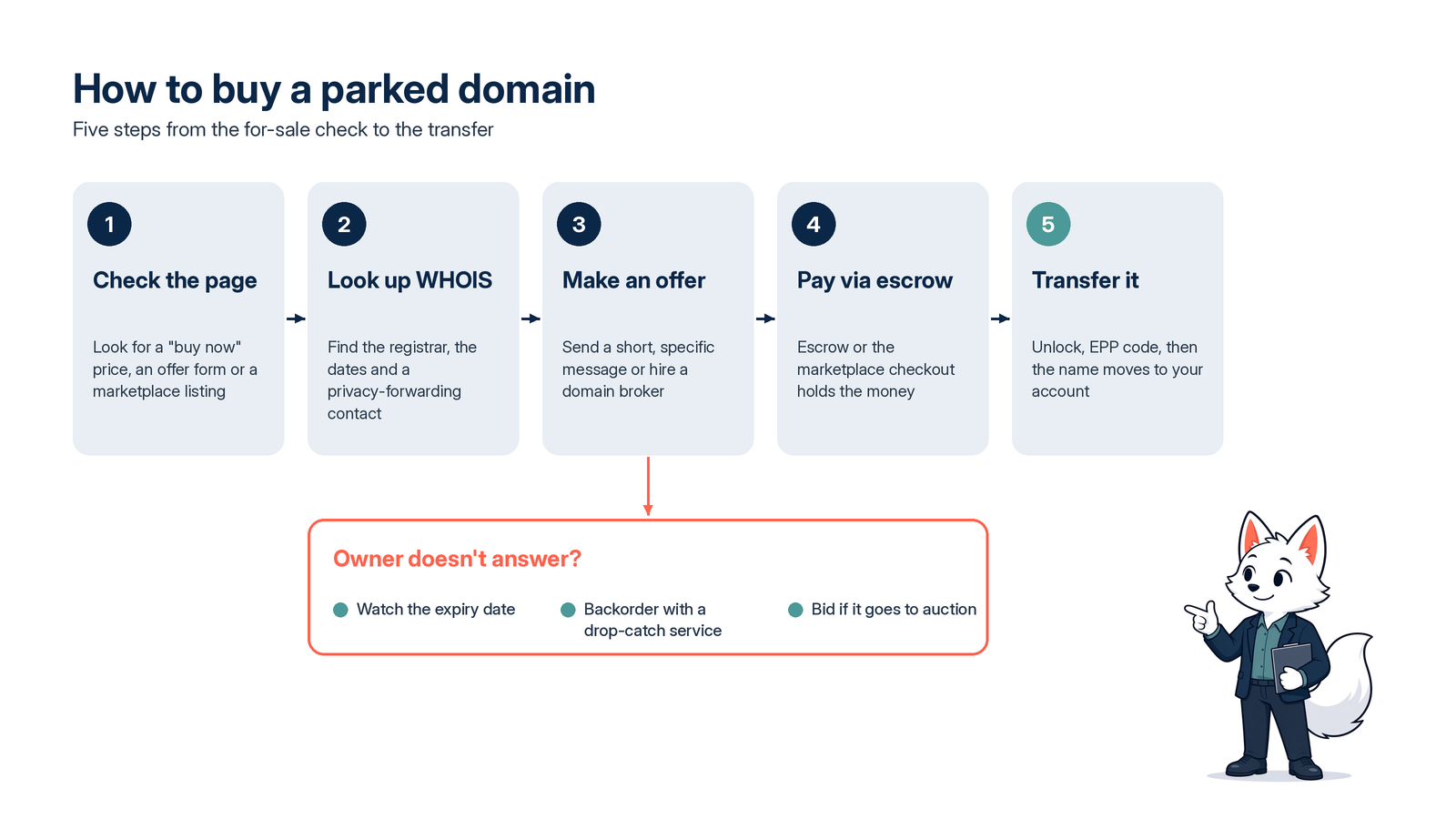
It works like buying any domain name that's taken from someone who already owns it: find out whether it's for sale, reach the owner, agree on a price, pay through escrow, and transfer it. Here's the process in order.
1. Check the page for a "for sale" notice or marketplace listing
Start with the page itself. A "buy now" price or "make an offer" form means you can usually buy right there, and the marketplace handles payment and transfer. If the page shows only ads, search the domain on the big marketplaces anyway, since many investors list names without a banner.
2. Look up the owner in WHOIS
Run the WHOIS lookup from the section above. Since GDPR, most personal contact details are redacted, but you'll still see the registrar, the dates, and often a privacy-forwarding email or a contact form. That's enough to send a message.
3. Make an offer, or use a domain broker
Write a short, specific message: who you are, that you're interested in the name, and an opening offer. If the name matters a lot or the owner is a big portfolio, a domain broker can negotiate for you and keep your identity private.
4. Pay through escrow
Never wire money directly to a stranger for a domain. Use an escrow service (Escrow.com is the best known) or the marketplace's own checkout. Escrow holds your payment until the domain is in your account.
5. Transfer the domain to your account
The seller unlocks the domain and gives you the authorization code (EPP code), or pushes it to your account if you both use the same company. Keep in mind that domains usually can't move to a different registrar within 60 days of registration or a previous transfer under ICANN's transfer policy.
What if the owner doesn't answer?
If the owner never replies, watch the expiration date in WHOIS. If the domain isn't renewed, it goes through grace and redemption periods and can then be released. A backorder with a drop-catching service gives you a shot at it then, though popular names often go to an expired domain auction.
What affects the price of a parked domain?
Parking adds nothing to the price of a domain. What usually moves the number:
- Length and how easy it is to say and spell
- The extension (.com still sets the bar)
- A commercial keyword in the name
- Real type-in traffic
- History: backlinks, past use, and any spam or penalty baggage
If you want a feel for how investors weigh these signals, here's how investors analyze a domain name.
How to list a parked domain for sale
If you're on the other side and want to sell the domain name, parking can do the selling for you. Three steps cover most cases:
- Swap the ads for a sales banner. Most parking services and marketplaces let you show a "buy now" price or a "make an offer" form instead of ads.
- List it on a domain marketplace. Buyers search marketplaces directly, so a listing reaches people who never visit the page.
- Keep the WHOIS contact reachable. A privacy-forwarding email or contact form lets interested buyers reach you.
Is a parked domain worth buying for SEO?
It's usually worth little for SEO if it has sat idle for years, because there's no content and the old links have been fading the whole time. Search engines treat placeholder pages as thin, and links that once pointed at a real site tend to go stale or disappear.
Travelhacks.net is a good example: a name that sounds valuable for a travel blog, with no real content in years of snapshots. A buyer would get the name, not a history.
The picture changes when a domain had a real site for years and was parked only recently. Then some of the old link equity may still be there, and the history matters a lot. Before you buy one for SEO, check:
- Wayback history. Was there a real site, for how long, and on what topic? Our guide to domain history lookup shows how to read it.
- Backlinks. Are the links real editorial mentions or spam directories? Do they still resolve?
- Spam and topic changes. Pharma, gambling, adult or doorway pages in the past can follow the domain. That's what Karma Score grades: a domain's content history, built to flag exactly this.
- Parking length. The longer the domain sat empty, the less you should expect from its past.
Is domain parking legal? Security risks to know
Domain parking is legal. The trouble starts with what's parked and what the page does.
- Cybersquatting. Holding a name that copies someone's trademark to profit from it can cost you the domain. Trademark owners can file a complaint under ICANN's Uniform Domain-Name Dispute-Resolution Policy (UDRP) and get it transferred.
- Typosquatting. Domains that are common misspellings of popular sites catch people who mistype a URL. This kind of domain squatting is a classic parking play and a common UDRP target.
- Malvertising. Some monetized parking sends visitors through layers of ad resellers. In large-scale tests, Infoblox researchers found that over 90% of the time visitors to parked domains ended up at scams, malware or other unwanted content.
- Phishing. Malicious domains often start out parked. A lookalike name can sit quiet and then switch to a phishing page or a fake login, which is why domain security teams watch new lookalikes.
FAQ
What can I do with a parked domain?
You can keep it for a future project, point it at your main site as a redirect, sell it through a marketplace, or put it into a monetized parking program. Or simply build a site on it later.
Are parked domains safe and legal?
Parking itself is legal, and a plain default page is harmless, but ads on parked domains sometimes route visitors through ad resellers to scams or malware. Misspelled names are the most common offenders. If you land on an unfamiliar parked page, don't click the ads or download anything it offers.
Why are parked domains blocked?
Parked domains are often blocked as a category by security filters, browsers and ad networks, because they offer little content and carry a higher risk of malicious redirects. Blocking the category is simpler than vetting each page, so even harmless pages get caught.
Can you make money from a parked domain?
Yes, but usually not much. Monetized parking pays a share of ad clicks, so only names with real type-in traffic earn anything noticeable. Most of the money comes from selling the name: buying and parking names to resell is the usual investor play.
Can a parked domain be used for email?
Yes. Email runs on the domain's MX records, not on a website, so an email address on the name works without a site. If you move the nameservers to a parking service, check that your MX records come along.
Why is my domain showing as parked?
Usually because the domain isn't pointed at your hosting yet. A newly registered name shows a default page until you change its nameservers or add an A record for your site. Check the DNS settings in your domain management panel. After a fix, the change can take a few hours to show up.
How do I park a domain?
Most of the time you don't have to do anything. A name left alone shows the seller's default page. If you want ads or a for-sale banner on it, switch the nameservers to a parking service and add the domain to your account there.
Conclusion
A parked domain is a name someone owns but isn't using, and it's often one you can buy. Check the WHOIS record and the archive before you reach out, and if you're buying for SEO, judge the domain by its history, not by the name alone.