
Why are your backlinks not showing in Moz? Because Link Explorer only reports what its own crawler has found and kept in Moz's index. This guide is for SEOs and link builders who see a link on a live page but not in the tool: the eight usual causes, a seven-step check for one URL, and how to find the rest of your backlinks with another backlink checker.
Table of Contents
- Table of Contents
- The short answer
- 8 reasons your backlinks are not showing in Moz
- 1. The link is too new
- 2. Moz hasn't crawled the linking page yet
- 3. robots.txt or the server blocks Dotbot
- 4. The link is rendered with JavaScript
- 5. The page's canonical points somewhere else
- 6. The linking page is noindex
- 7. The link was removed, changed or redirected
- 8. You're looking at the wrong view, filter or export
- How to check if Moz can see a specific backlink
- How often does Moz update its link index?
- Why Moz, Ahrefs, Majestic and Semrush show different backlink counts
- Where to find the rest of your backlinks
- How to find low-quality backlinks with Moz
- FAQ
- Why does Moz not show all my backlinks?
- Why does Moz mark a backlink as lost when it still exists?
- What if backlinks are still not showing after several weeks?
- How do I find broken backlinks?
- Why is Moz not exporting all links?
- Can I force Moz to crawl my backlinks?
- Why does Moz show fewer backlinks than Semrush or Ahrefs?
- One index is a partial picture
The short answer
Moz only shows backlinks that its crawler, Dotbot, has discovered, crawled and added to its index. If the referring page is new, blocked, canonicalized elsewhere, marked noindex, or renders the link with JavaScript, or if the link was removed, it won't appear. No backlink checker sees the whole web, so compare several sources. A link the tool hasn't found can still count for Google, so missing data isn't the same as lost SEO value.
Even at over 40 trillion links, the index "doesn't cover the whole web" (How we index the web).
8 reasons your backlinks are not showing in Moz
- The link is too new.
- Moz hasn't crawled the linking page yet.
- robots.txt or the server blocks Dotbot.
- The link is rendered with JavaScript.
- The page's canonical points somewhere else.
- The linking page is noindex.
- The link was removed, changed or redirected.
- You're looking at the wrong view, filter or export.
1. The link is too new
Newly discovered links can appear "in about 3 days" (Why links aren't appearing). The catch is the word discovered: discovery itself can take much longer. The discovery date also isn't when the link was created, so a "new" one may be old on the web.
So how long does it take for backlinks to show up? Days on a well-linked page, weeks or longer on a quiet one. Add the referring URL to a Link Tracking List and watch for it.
2. Moz hasn't crawled the linking page yet
This is the usual answer to "why do some links show up on Moz and not others." Dotbot runs on a machine-learning model trained to pick pages like the ones a search engine shows in Google results. It weighs the page's own inbound links, the quality of the sites pointing to it, URL length and folder depth (How we index the web). A well-linked homepage gets visited fast. A page buried four folders deep on a small blog with no inbound links may never be.
To check, enter the referring page's URL in Link Explorer. No data for that page means your link isn't in Moz's index either.
3. robots.txt or the server blocks Dotbot
Open the referring site's /robots.txt. A Disallow under User-agent: * or User-agent: dotbot keeps the bot out (Dotbot). Dotbot reads robots.txt once per site per index crawl, so a fix takes a while.
Firewalls, bot protection and 4xx or 5xx status codes stop it too, and only the site owner can lift that block.
4. The link is rendered with JavaScript
Dotbot follows plain HTML, meaning an <a href="..."> in the page source. Anything a widget or script inserts after load may never be seen. Test with View Source (Ctrl+U). Inspect shows the rendered page, where a JavaScript link looks fine even though bots never get it.
5. The page's canonical points somewhere else
Dotbot reads a page for links only when its canonical tag points to itself, and the match has to be character for character, including protocol and letter case (Why links aren't appearing). A page that canonicalizes to another URL may be indexed but isn't read for content.
6. The linking page is noindex
A page with noindex, follow or noindex, nofollow doesn't get its outbound links recorded. Check the <meta name="robots"> tag in the source and the X-Robots-Tag HTTP header.
7. The link was removed, changed or redirected
A backlink marked as lost means Dotbot went back to the page and couldn't find it. The help page says that "doesn't necessarily mean the link has been removed" (Troubleshooting lost links). A 404, a brief 5xx outage, a new noindex tag or a changed or 301-redirected URL all produce the same label, and intermittent errors are marked as active again on the next good visit. That's why tools sometimes call a live link lost.
Old backlinks don't age out of the index. They show up in Discovered and Lost, and a referring site counts as lost only when none of its links to you are active.
8. You're looking at the wrong view, filter or export
If your report is missing links you know exist, check the settings first. Here's how to check backlinks with Moz Link Explorer: enter the target and pick root domain, subdomain or exact page (Inbound Links). A link to blog.example.com won't appear under an exact-page query for example.com/. Link Type splits follow, nofollow and redirected, Link State splits active from lost, and a forgotten filter can hide half your backlink profile. With a Link Source filter, you see only the top 10 results from that source, and any sort or filter looks at the top 100,000 total links.
Downloads have limits too. A free account gets 10 queries per month (Link Explorer), and Moz Pro tiers cap "Results per Backlink Query" (pricing). A CSV with filters on returns only the filtered rows.
Internal links are a separate tool. Site audits come from Rogerbot, the bot behind Moz Pro Site Crawl (Rogerbot). If the tool "isn't reading your internal links," or the audit's counts look off, look in Site Crawl, not Link Explorer.
How to check if Moz can see a specific backlink
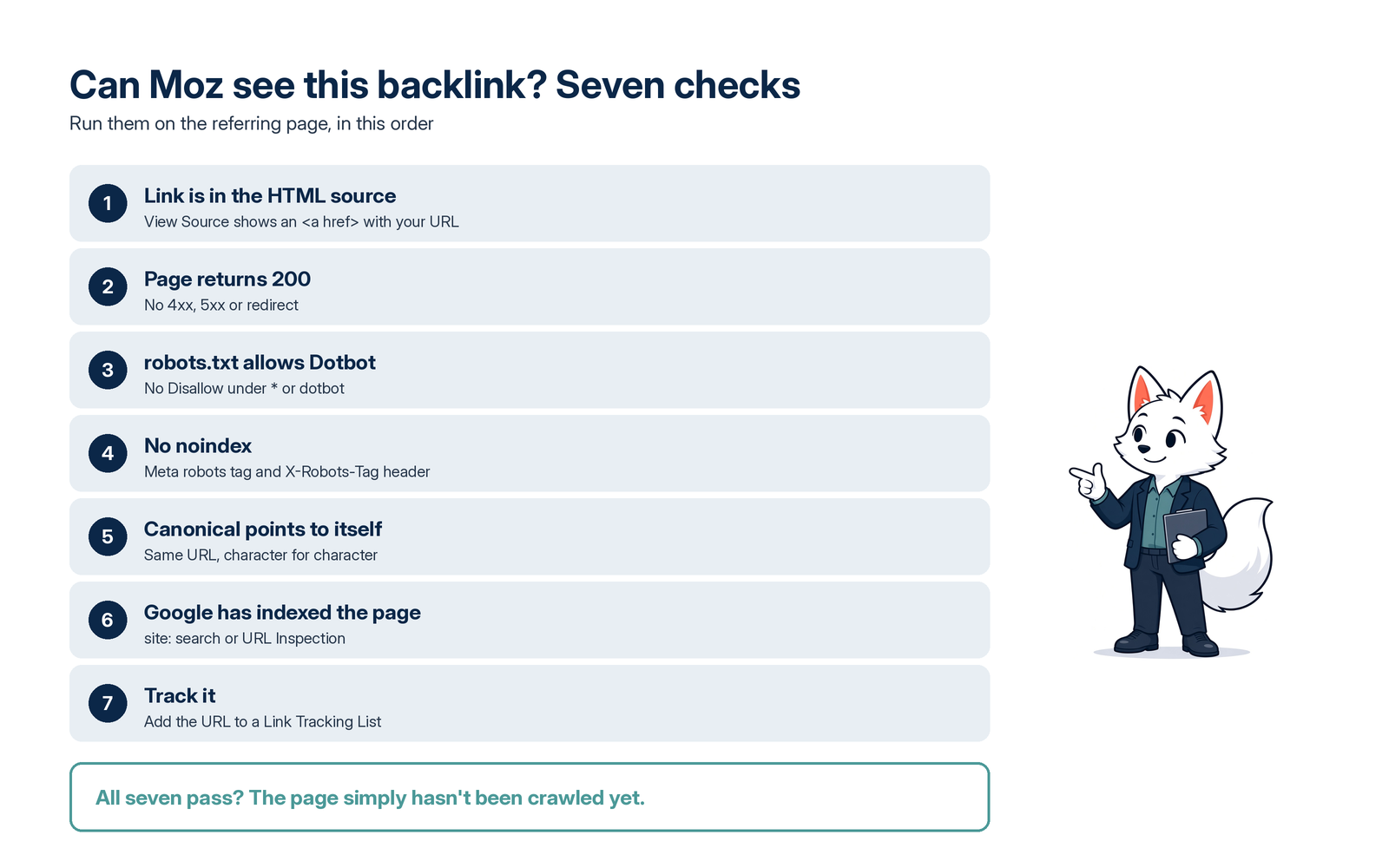
Run these seven steps on the referring page:
- Find your link in View Source and confirm it sits in an
href. - Check that the page returns a 200 status code and doesn't redirect.
- Open the site's robots.txt and look for rules under
User-agent: *andUser-agent: dotbot. - Look for
noindexin the meta robots tag orX-Robots-Tagheader. Note the link'sreltoo: nofollow, ugc and sponsored change how a link counts, not whether it can be found. - Compare the canonical tag with the page URL, character by character.
- Confirm Google has indexed the page with a
site:search, or URL Inspection if it's your site. - Add the URL to a Link Tracking List and check back in a few days.
If all seven pass, the page simply hasn't been crawled yet.
How often does Moz update its link index?
The index is described as "constantly updating" (How we index the web). New links appear about three days after discovery, high-quality pages are revisited at least every 90 days, and most of what's indexed comes from pages crawled in the last six months. Domain Authority and Page Authority change only when new or lost links are found for the site. MozBar shows the same DA and PA. If you want to move those numbers, here's how to increase Moz Domain Authority.
You can't force a recrawl; a Link Tracking List monitors discovery without guaranteeing a date.
Why Moz, Ahrefs, Majestic and Semrush show different backlink counts
Every backlink database runs its own bot, picks which pages to visit, and counts its own way. Moz's FAQ says each index "will build up a slightly different picture of the web," which is why many SEOs combine several SEO tools.
| Tool | Crawler | Main count | Where to look |
|---|---|---|---|
| Moz | Dotbot | Linking Domains, Domain Authority | Link Explorer |
| Ahrefs | AhrefsBot | Referring domains, Domain Rating | Site Explorer |
| Majestic | MJ12bot | Referring domains, Trust Flow | Site Explorer |
| Semrush | SemrushBot | Referring domains, Authority Score | Backlink Analytics |
The gaps come from crawl priorities, freshness, how long removed links stay counted, and whether nofollow and redirected ones are included. Bigger isn't automatically better, as the example below shows.
Where to find the rest of your backlinks
Google Search Console: Links report
For your own site, this is Google's data, but still a sample: the report "isn't a comprehensive list of every link," tables stop at 1,000 rows, nofollow isn't marked, and removed links can linger (Search Console Help: Links report). The download goes up to 100,000 rows.
Bing Webmaster Tools: Backlinks
Bing's report is free and shows referring domains, pages and anchors for your verified site, and "Backlinks to any site" compares you with up to two competitor sites you don't own (Bing Webmaster Tools Help: Backlinks). Bing calls its data "a representative set," not a full profile.
Other backlink checkers
Ahrefs Free, formerly Ahrefs Webmaster Tools, shows up to 1,000 backlinks at once for sites you verify. Majestic and Semrush run their own databases; check their current free limits. For competitors or names you might buy, you need paid access or a tool that already stores their metrics.
Compare all link databases in one report
Karma.Domains stores Moz, Ahrefs, Majestic and Semrush metrics side by side for 13M+ domains, so I see these gaps daily. Here's one I pulled on 3 November: ky-ebricks.com, a lapsed site that sold LEGO-compatible building instructions.
| Source (checked 3 November) | Referring domains | Backlinks |
|---|---|---|
| Moz, Karma.Domains report | 600 | 997 |
| Moz, live check same day | 635 | 1,026 |
| Semrush, Karma.Domains report | 358 | 510 |
| Majestic, Karma.Domains report | 101 | 128 |
| DataForSEO API, live links | 138 | 205 |
That's a sixfold spread on one domain, and Ahrefs rated it DR 0.5.
So I opened them. In Moz's 38-link sample, 33 came from near-identical "domain-list" directory pages. I checked seven: two hosts didn't respond, two returned 404, one redirected, and the two that loaded no longer had the link. The quality backlinks, from a LEGO fan forum and two hobby blogs, were live, in plain HTML, on self-canonical pages. Most of Moz's lead came from directory pages that, in the sample I opened, no longer point to the site.
A high count can be padding, so read the referring pages in more than one tool before trusting any single number. To compare sources yourself, see how we show Moz data in the Karma.Domains report, along with Ahrefs data, Majestic data and Semrush data, or combine Moz, Ahrefs and Majestic filters in one search.
How to find low-quality backlinks with Moz
Start with your referring sites (Moz calls them Linking Domains): open that report and sort by Spam Score. Spam Score is the percentage of sites with similar features found penalized or banned by Google, and 1% to 30% counts as low (Moz: Spam Score). A high score is a reason to look closer, not proof of spam. You can check Spam Score for free on any site.
Then read the anchor text. Mostly bare-domain, exact-match keyword or ad-like anchors point to spammy links from directories and auto-generated pages. In the ky-ebricks.com sample, 86.84% of anchors were just "ky-ebricks.com," and one read "Boost ky-ebricks.com For Ahrefs DR, Moz DA, & Majestic TF with Quality Dofollow Backlinks." You can check backlink anchor text the same way.
Last, check what the referring sites are about. LEGO forums pointing to a LEGO site is a normal backlink profile; 33 unrelated directories isn't. Before you disavow anything, open the pages: a toxic-looking count is often dead directory pages.
FAQ
Why does Moz not show all my backlinks?
If you're asking "why isn't Moz pulling up my backlinks?", the answer is that it shows only what Dotbot has discovered, crawled and indexed. Links on new, deep, blocked, noindex or non-canonical pages, and ones added with JavaScript, often never get there. Some gaps are normal for any SEO tool.
Why does Moz mark a backlink as lost when it still exists?
Usually because Dotbot hit an error when it went back: a timeout, a 5xx, a 404, a 301 or a new noindex tag. As noted above, lost "doesn't necessarily mean the link has been removed." If the page loads and the link is in the source, it should be marked as active again after the next good crawl.
What if backlinks are still not showing after several weeks?
Run the seven-step check on the referring page. If it passes, the page probably has too few inbound links of its own to be crawled soon, and waiting may be the only option.
How do I find broken backlinks?
In Link Explorer, set Link State to Lost and open the referring pages. A 404 or a 301 to an unrelated page means the link is gone. For links worth keeping, a short outreach email to the site owner with the correct URL can get them fixed. Check your own broken links too: point deleted pages on your site to live ones with a 301.
Why is Moz not exporting all links?
Usually a filter or a row cap. A CSV returns only rows that match your active filters, and the row limit depends on your subscription. Clear the filters, check the root domain or exact page setting, and download again.
Can I force Moz to crawl my backlinks?
No. You can't request a crawl or ping anything. Add the referring URLs to a Link Tracking List to watch for discovery, and make sure each page returns 200, isn't noindex, canonicalizes to itself and has the link in plain HTML.
Why does Moz show fewer backlinks than Semrush or Ahrefs?
It often does, but not always: each tool runs its own crawler with its own priorities and counting rules, so Moz can show fewer or more. In our example, it reported the most referring sites of any source, mostly from directory pages.
One index is a partial picture
Backlinks not showing in Moz are usually a crawl or counting question, not an SEO problem with your site. Run the seven steps on the referring page, cross-check Search Console, Bing and one more backlink checker, and judge each link by the page, not the count. Buying a domain for its links? Open a sample of the referring pages before you bid, and read our guide to expired domains with great backlinks first. When you're ready, you can find expired domains with verified backlinks on Karma.Domains or browse the list of expired domains with backlinks.