- How Name filters work
- Domain Name filter
- gTLDs/ccTLDs filter
- Domain length filter
- Numbers in domain and Hyphens in domain
- Letter pattern and Vowel pattern
- Word count
- Name type, Industry, and Name languages
- Brand Score filter
- Combining Name filters
How Name filters work
The Name tab filters domains by the name itself, not by the history of the site. It holds the fields that used to sit on the main tab and on Other filters, plus new pattern and classification fields.
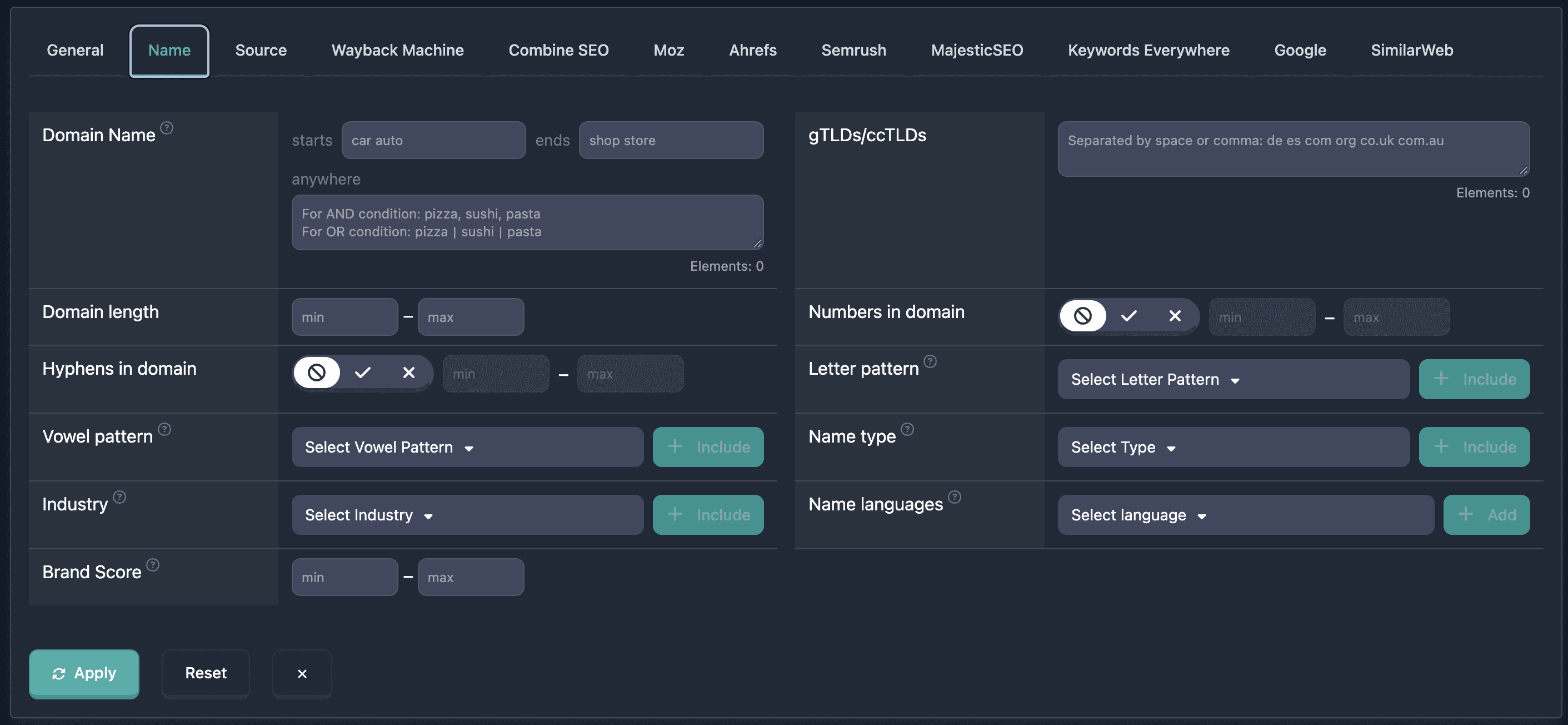
All filters use logical AND with the rest of the search: a domain must match every condition you set.
Important: Name type, Industry, and Name languages come from an AI reading of the domain name. That is not the site category, and it can be wrong.
Domain Name filter
Domain Name has three fields: starts, ends, and anywhere.
How to use
- Open the Name tab and find Domain Name
- starts — the name begins with one of the entered pieces
- ends — the name ends with one of the entered pieces
- anywhere — the name contains the entered pieces
Logic differs by field:
- starts and ends: a space or
|is always OR.car autoandcar | autoboth mean “starts with car or auto” - anywhere: a comma is AND,
|is OR. Placeholder: “For AND condition: pizza, sushi, pasta. For OR condition: pizza|sushi|pasta”
The Elements counter under anywhere allows at most 20 items. Over the limit, a red Maximum … elements allowed message appears.
Examples
Example 1: Names that start with car or auto and end with shop or store — starts car auto, ends shop store.
Example 2: The name contains both words — anywhere tech, news.
Example 3: The name contains any of the words — anywhere shop | store | buy.
gTLDs/ccTLDs filter
gTLDs/ccTLDs matches the domain zone. Enter several zones in one field, separated by a space or a comma. Placeholder: “Separated by space or comma: de es com org co.uk com.au”.
Zones can be written with a dot (.com) or without (com). Case does not matter. The Elements counter allows at most 20 zones.
Example: com, net, org or de fr uk nl.
Domain length filter
Domain length is the number of characters in the name, without the zone (example.com is 7).
Enter min, max, or both.
Example: Short names — min 1, max 5.
Numbers in domain and Hyphens in domain
Numbers in domain and Hyphens in domain each have a three-state toggle and a count range.
- Unknown (forbidden icon) — the filter is ignored
- No (cross) — the name has no digits, or no hyphens
- Yes (checkmark) — the name has digits, or hyphens. min and max then set how many. Leave them empty to accept any count above zero
Only the label before the zone is counted.
Example: No hyphens — set Hyphens in domain to No. Exactly one digit — Numbers in domain Yes, min 1, max 1.
Letter pattern and Vowel pattern
Letter pattern and Vowel pattern describe the shape of the name, one symbol per character.
Letter pattern: L is a letter, N is a digit, H is a hyphen, X is any other character. Example: LLLL.
Vowel pattern: V is a, e, i, o, u, or y. C is any other Latin letter. N, H, and X mean the same as in the letter pattern. Example: CVCV.
Pick a pattern from the list or type one, then click Include. Several patterns use OR: the name may match any of them.
Word count
Word count is how many words the name classification found. It is not the number of characters.
Enter min, max, or both. Values stay between 1 and 8.
Example: One word — min 1, max 1. Two words — min 2, max 2.
Names that have not been classified yet have no word count, so they do not match this filter.
Name type, Industry, and Name languages
These three fields are an AI classification of the name, not of the site. A help icon on each label says the analysis may be inaccurate.
- Name type — dictionary word, descriptive phrase, brandable, personal name, and extra types such as geographic, acronym, or a commercial phrase
- Industry — a topic read from the words in the name, such as travel, health, or software
- Name languages — languages of the ordinary words in the name
Select a value and click Include or Add. Several values use OR.
Brand Score filter
Karma Brand Score scores how brandable the name is: pronounceability, memorability, uniqueness, and appeal. Values are 0–100. Enter min, max, or both. The same score is shown on the Karma.Domains report tab.
Example: Strong brandable names — min 80, max 100.
Not every report has a Brand Score. A minimum above 0 drops domains where the score was not calculated.
Combining Name filters
Name filters combine with main search filters and the other tabs. Logic across filters is AND.
Example: .com names of 1–5 characters, no digits or hyphens, added in 2023, Karma Content Score 70–100.
- Name → gTLDs/ccTLDs:
com - Name → Numbers in domain: No
- Name → Hyphens in domain: No
- Name → Domain length: min 1, max 5
- General → Added at: 01.01.2023–31.12.2023
- General → Karma Content Score: min 70, max 100
You can save the combination.
The same breakdown of a single name is on the report tab Domain name.