- Who can create a link
- “Share” button in the report header
- Link window
- What the recipient sees via the link
- Validity and reuse
- Errors and common situations
- Related report features
- In short
Share lets you send a colleague or partner a link to the full report for a domain from Karma.Domains database sections. The recipient does not need an account: after a short check they open the same report as you, with all tabs and metrics. The link is valid for 60 days.
Available only on the Pro plan and only for reports from Auctions, Expired, Backorder, and Buy Now. Reports from Checker and the All domains aggregate cannot be shared.
Who can create a link
A signed-in user on the Pro plan can create a link if the report is already open in full (not in demo mode).
- If you are not signed in, clicking Share opens registration or sign-in.
- If your plan is not Pro, the button shows a pro badge; clicking opens the Pro plan window (same as Print/PDF).
- In demo mode (some data hidden), the Share button is not shown. Open the full report for credits first.
“Share” button in the report header

In the header of a full domain report from a database, next to Print/PDF, there is a Share button (share icon).
The button appears only for reports from Auctions, Expired, Backorder, and Buy Now. Reports from Checker and other types without sharing do not have it.
On first click the service creates a personal link to this report. If you already have a link for the same report that has not expired, the same window opens with the same link (no need to create again).
Link window
After clicking Share, the Share report modal opens.
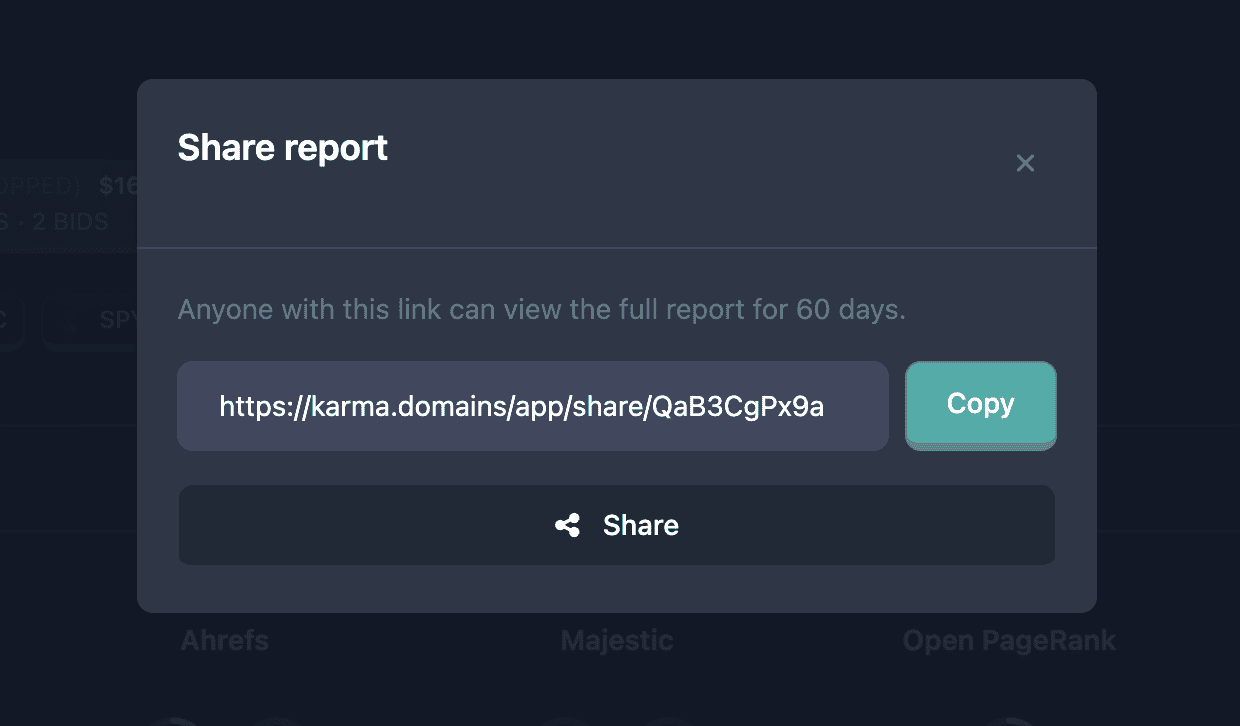
In the window:
- Link field — full URL to send to the recipient. The address leads to a page like
https://karma.domains/app/share/XXXXXXXXXX(short code at the end). - Copy — copies the link to the clipboard.
- Share (if the browser and device support the system share menu) — opens the standard OS dialog: messenger, email, notes, etc. The domain name and report link are inserted in the text.
Below the field: “Anyone with this link can view the full report for 60 days.”
Close the window with the X or by clicking the dimmed background.
What the recipient sees via the link
The recipient opens the link in a browser without signing in to Karma.Domains.
- Check — the screen briefly shows “Checking…” (protection against automated requests).
- Loading report — full domain data is loaded.
- Report page — at the top the label “Shared report access”, then domain name, summary, tabs (Moz, Majestic, Wayback Machine, etc.) and the rest of the report content.
What guests can access
- Full report: summary, all tabs with metrics, archive screenshots, link tables, etc. (same as the report owner, without demo masking).
- Quick links block to external SEO services (SEMrush, Ahrefs, Moz, etc.).
- Domain action buttons for reports from Auctions, Expired, Backorder, and Buy Now: go to auction, registrar, listing, etc. (see report header).
- Who.is link for reports from Expired (if present in the report).
What guests do not have
- Favorites, annotations, and your personal notes on the report.
- Print/PDF and Share again (only the Pro owner can create a link).
- Check drop and other actions that require your account.
- Full navigation across Karma.Domains databases and tables (the guest sees only this report).
Validity and reuse
- The link is valid for 60 days from creation.
- While it has not expired, you can open Share again for the same report: the window shows the same link.
- After expiry the recipient sees “Link not found or expired” and a “To Karma.Domains” button. To grant access again, click Share in the report (a new link will be created).
You cannot revoke a link manually in the interface: access ends after 60 days.
Errors and common situations
No “Share” button
- Report in demo mode — open the full report.
- Report type not from Auctions, Expired, Backorder, or Buy Now (e.g. Checker).
- Report opened in a mode where the action header is hidden.
Pro or registration window opens on click
- Sign in and Pro plan required.
Recipient sees “Link not found or expired”
- 60 days passed, the link was mistyped, or the report was removed from the system. Ask the sender to create a new link from the current report.
“Share” window does not open after click
- Wait a few seconds (server request in progress). On network failure refresh the report page and try again.
System “Share” button not shown in the window
- Browser or OS does not support Web Share API (often on desktop). Use Copy and paste the link manually.
Related report features
- Report header, summary, and tabs — Report page: header and summary.
- Print/PDF — separate header button; guests via shared link cannot download PDF.
- Annotations are saved in your account and shown on the print title page; they are not passed via guest link. See Report notes and tags.
In short
- Share — link to full report for 60 days, Pro only, only Auctions, Expired, Backorder, and Buy Now.
- Button in report header; in the window — Copy and when supported — Share.
- Recipient without account sees full report after check; no favorites, annotations, print, or your personal actions.
- Expired or invalid link — error message; new link created by report owner with Pro.